

Missed deadlines are one of the most expensive operational failures a law firm can have because they can destroy a client’s position and create immediate malpractice exposure. In an ABA-cited breakdown of malpractice claim causes, calendar-related errors total about 34%, including failure to file (10.7%), improper calendaring (7.4%), and failure to know or ascertain deadlines (6.4%), plus related follow-up and clerical issues. The same analysis shows how concentrated the risk is in smaller practices, with 70% of claims filed against firms with five or fewer attorneys. Those numbers matter because they point to a predictable reality: deadline failures are rarely about not caring; they are about workload, fragmented attention, and weak verification habits.
Swiss Re’s professional liability guidance describes the most common pattern in plain terms: a client supplies a date, the attorney (or staff) relies on it without verifying against documents already in the file, and the firm misses a statute of limitations. The same paper also notes another recurring cause of claims: someone calendars the date wrong, then the mistake survives because nobody double-checks it. Even the best software cannot “feel” that something is off when the input is wrong, because the system can only compute from the trigger date it is given. This is why deadline control is best understood as a human-led risk system that uses software, not a software feature that replaces judgment.

Virtual Legal Assistant Docketing vs. Automated Legal Software
A virtual legal assistant strengthens docket control because they provide independent redundancy and consistent attention to the “deadline loop,” especially when attorneys are moving fast. The Bar Association of San Francisco highlighted a related pressure point: there were over 5,000 substantive court rule changes in 2016, and their message was that calendaring remains the leading cause of malpractice claims even as technology improves. Rule volatility and local procedural quirks mean deadline work is not just arithmetic; it is interpretation, verification, and documentation.
A virtual legal assistant helps because they can focus on the operational details that slip through when an attorney is in hearings, negotiations, or drafting sprints. That focus is not robotic; it is professional vigilance: reading the order, spotting ambiguity, and asking the attorney for confirmation before “locking in” a date.
Automation still has value, and it is worth acknowledging the alternative view. Deadline calculators, case management rulesets, and court e-filing integrations can reduce manual steps and standardize counting in common scenarios. The risk is that firms over-trust automation and under-invest in verification, especially when staff assume the software “knows the rule,” even though the trigger date was misread or the service method was wrong. Swiss Re’s risk materials repeatedly emphasize that docketing mistakes are often human mistakes, including mis-keyed dates and failures to complete tasks even when a deadline exists on a calendar. A strong approach is not “humans or software,” it is a documented process where software supports a trained person who verifies, escalates, and closes the loop with evidence.
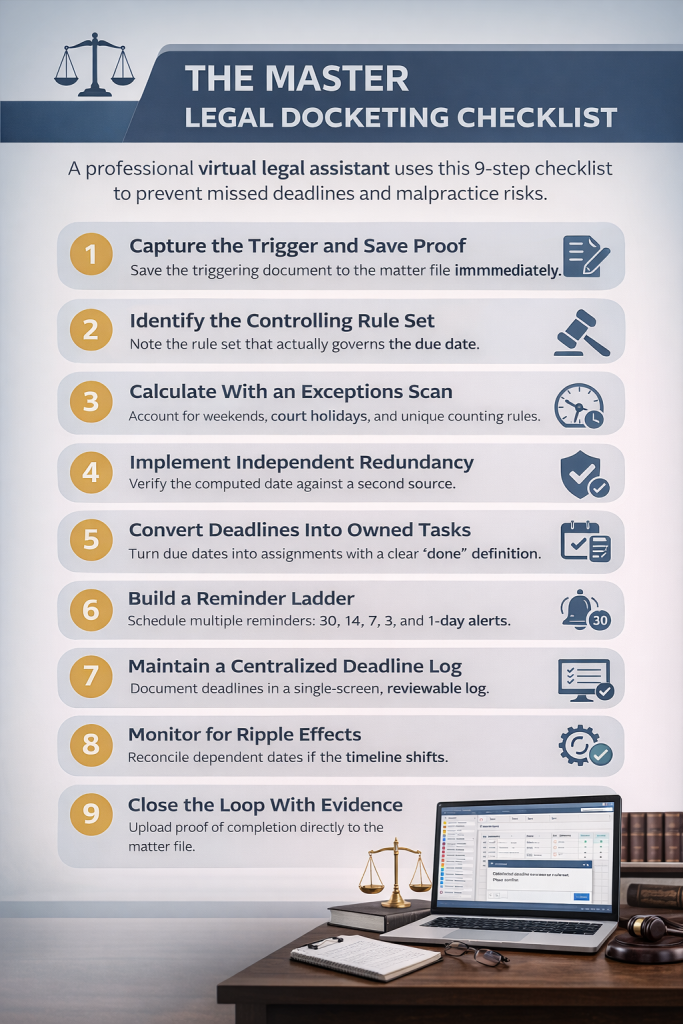
The Master Legal Docketing Checklist
A professional legal VA uses the checklist below to make deadline management defensible, predictable, and easy for the attorney to review. Each step is designed to reduce a specific malpractice failure mode, like relying on unverified dates, miscalculating deadlines, or assuming a filing was completed without proof. The checklist also improves internal coordination because it turns “dates” into owned tasks with audit trails. Swiss Re’s guidance on docket systems underscores that consistent procedures, reminders, and responsibility assignment are what keep a practice from missing time limitations.
1) Capture the Trigger and Save Proof
Capture the triggering event and immediately attach evidence to the matter file, because “I saw it in an email” is not proof. A trigger can be a filed-stamped order, an ECF notice, a certificate of service, a hearing notice, or a contractual notice date. Swiss Re describes claims where attorneys rely on client-provided dates without verifying against documents already in their possession, and this step blocks that failure at the start. In practice, a virtual legal assistant will respond to an email like “we served Tuesday” by requesting the certificate of service or checking the docket sheet before docketing anything as final.
2) Identify the Controlling Rule Set
Identify what actually governs the due date before calculating, because “typical timing” is where errors breed. The rule set might be federal rules, state rules, local rules, a judge’s standing order, or a scheduling order that overrides defaults. The virtual legal assistant records the rule source in the deadline note so the attorney can sanity-check in seconds and so future staff can re-verify without re-reading the entire file. This step also reduces hidden inconsistency across attorneys, where one person counts days one way and another person assumes a different standard. Over time, naming the rule set builds a structured dataset that improves internal training and reduces repeated mistakes.
3) Calculate With an Exceptions Scan
Calculate the deadline, then run an exceptions scan that treats court reality as part of the math. The virtual legal assistant checks weekends, court holidays, jurisdiction-specific counting rules, filing cut-off times, and whether the service method changes timing. The Bar Association of San Francisco’s warning about rule changes is relevant here because it is easy for a firm to apply last year’s habit to this year’s rules. The output should be a computed date plus a short explanation like “counted from service date on certificate, adjusted for holiday,” so the attorney can confirm logic rather than reverse-engineering it.
4) Implement Independent Redundancy
Verify the computed deadline against a second source, and do it in a way that is truly independent. “Independent redundancy” can mean checking the court docket sheet, confirming against the ECF notice, or using a second software tool that calculates deadlines separately. The goal is to catch bad triggers and misreads early, because those errors become expensive when discovered on the eve of filing. The BASF guidance explicitly frames independent redundancy as a best practice for preventing the leading cause of malpractice claims. A practical workflow is for the virtual legal assistant to message the attorney: “New order in Smith. I calculated X based on Y. Please confirm the trigger date and rule set so I can lock it in.”
5) Convert Deadlines Into Owned Tasks
Assign every deadline to an owner and convert it into a task with a definition of done, because a calendar entry is passive. A task should include who drafts, who reviews, who files, and what “complete” means in evidence terms. Swiss Re notes that firms can still face claims when an attorney fails to complete a task even though it was calendared, which is why task ownership matters. A strong done-definition is explicit: “Filed and receipt saved to matter,” or “Served and certificate uploaded,” not “motion handled.”
6) Build a Reminder Ladder
Schedule a reminder ladder that matches how legal work actually gets done, instead of relying on a single last-minute tickler. Swiss Re’s docketing guidance recommends multiple reminders and states that reminder reports should be generated regularly, with several reminders before a deadline arrives. A common ladder is 30, 14, 7, 3, and 1-day reminders, plus a day-of confirmation, with earlier reminders focused on drafting and review. The virtual legal assistant can add real value here by asking a human question that software does not ask: “Do you want me to reserve a review block two business days before this filing?”
7) Maintain a Centralized Deadline Log
Document deadlines in a single-screen log that shows the trigger, controlling rule set, computed date, owner, buffer date, and proof link. This is not paperwork for its own sake; it is an audit trail that makes diligence review fast and keeps the firm calm when staffing shifts. The ABA-cited breakdown of calendaring failures includes “failure to know or ascertain deadlines,” which often happens when the “why” behind a date is lost across emails and notes. A centralized log prevents that by making assumptions explicit and reviewable. It also creates a clean agenda for weekly docket reviews because the attorney can scan upcoming risks in minutes.
8) Monitor for Ripple Effects
Reconcile deadlines whenever something changes, because litigation calendars are dynamic and changes rarely affect only one date. Continuances, amended scheduling orders, rejected filings, and court deficiency notices can shift multiple dependent deadlines. The virtual legal assistant should treat every new court notice as a trigger for a quick “ripple scan” across the matter’s timeline and task list. BASF’s emphasis that calendaring errors remain the leading cause of claims is a reminder that change management, not initial entry, is where many systems fail. A good standard is to reconcile dependent deadlines within 24 hours of a meaningful court update and to alert the attorney with a short summary of what moved and why.
9) Close the Loop With Evidence
Confirm completion with evidence, because the risk does not end when someone says, “I filed it.” The virtual legal assistant uploads the ECF receipt, filing confirmation, service certificate, or vendor proof into the matter and links it directly to the completed task. This approach aligns with insurer guidance that docketing mistakes and clerical mistakes can happen to any attorney, and that documentation is part of managing the fallout and preventing repeat errors. Evidence-based closure also protects billing, because it gives the firm clean records when clients ask what was done and when. If you cannot prove it, you will spend time reconstructing it later, usually when time is most scarce.

The Boundary: Delegation Is Not Abdication
A key compliance and ethics point is that delegating docket execution does not delegate professional responsibility. In Pincay v. Andrews, the Ninth Circuit wrote that “a lawyer’s obligation to know relevant law cannot be delegated … to a nonlawyer,” criticizing reliance on staff without an attorney’s knowledge of the governing rules. That does not mean virtual legal assistants should not do docketing work. It means the firm should define attorney oversight points, especially for critical deadlines like statutes of limitation, appeals, dispositive motions, and trial-related cutoffs.
The balanced, defensible model looks like accounting controls: the virtual legal assistant runs intake, calculation, reminders, reconciliation, and evidence capture, while the attorney reviews and confirms designated high-risk deadlines. This model respects the reality that small firms face disproportionate risk, while still taking advantage of a virtual legal assistant’s ability to reduce context switching and tighten process consistency. It also solves the “software trust” problem because the attorney is not relying blindly on automation or staff; they are relying on a documented system with explicit review gates. When done correctly, docketing becomes a communication loop that keeps deadlines visible, verified, and provable, even when the firm is busy.