
Clio vs. MyCase: Features, Pricing, and Best Choice for Law Firms

Practical guidance for building efficient, accountable legal support operations.
Clio and MyCase are leading legal practice management platforms that law firms use to organize cases, automate workflows, manage billing, and scale daily operations. Clio vs MyCase comparison centers on overall practice management approach, depth of features, scalability, and cost structure for different firm sizes. Clio emphasizes a broad ecosystem with advanced integrations, customizable workflows, and strong reporting and analytics suited for growing and mid-sized firms. MyCase focuses on simplicity, built-in client communication, and all-in-one usability designed for small firms and solo practices.
Clio vs MyCase feature comparison includes case management, document organization, deadline tracking, billing and payments, client portals, and communication tools. Law firms using A study by Munnangi titled “Empowering Access to Justice through Automated Legal Case Management” (2024) reported that automated case management systems increased case-handling capacity and reduced case backlogs across multiple jurisdictions, demonstrating clear efficiency gains.
Clio offers tiered pricing with scalability as firm needs expand, while MyCase provides more predictable pricing with core features bundled. Typical costs vary by plan level, user count, and add-ons, making cost-effectiveness dependent on growth plans.
Clio vs MyCase selection for a small law firm depends on practice area complexity, reporting needs, integration requirements, and budget tolerance. Both platforms support virtual assistants through shared task lists, document access controls, and communication workflows. Legal case management systems like Clio and MyCase deliver value through structure, automation, and ecosystem support, with real-world usability differing based on firm size, staffing model, and operational maturity.
Aristolaw helps law firms optimize legal operations. Schedule a consultation with Aristolaw to streamline your law firm workflows with outsourced legal support solutions today. Aristolaw helps provide trained legal support staff experienced with platforms such as Clio and MyCase for case management, client intake, billing, document workflows, and administrative support.
What is Clio?
Clio is a cloud-based legal practice management and case management platform that helps law firms manage matters, clients, documents, billing, and workflows in one system. Clio serves solo lawyers, small firms, and growing practices seeking centralized legal practice management without on-premise infrastructure.
Clio core modules include matter management, time tracking and billing, document organization, client portals, reporting, and a wide range of third-party integrations. Clio functions as law firm software designed to improve operational visibility, workflow coordination, and scalability across legal teams.
What is MyCase?
MyCase is a cloud-based legal case management and practice management platform designed to help law firms manage cases, communication, billing, and client workflows efficiently. MyCase positions itself as an all-in-one solution for solo lawyers and small law firms seeking simplicity and unified workflows.
MyCase core modules include case management, document storage, client portals, messaging, time tracking, billing, and online payments. MyCase functions as legal case management software that centralizes law firm workflow and client interaction within a single platform.
How do Clio vs. MyCase compare?
Clio vs. MyCase differs mainly in platform approach, with Clio emphasizing scalability and integrations while MyCase focuses on an all-in-one, streamlined workflow for daily law firm operations. Clio vs MyCase comparison commonly states Clio’s broader integration ecosystem and customization options versus MyCase’s simplified setup, built-in communication, and bundled features.
Clio suits growing firms that require advanced reporting, automation, and third-party tools, while MyCase fits solo and small firms seeking ease of use and faster onboarding. Clio vs MyCase pricing style also differs, with Clio offering tiered plans that scale with complexity and MyCase providing more predictable, inclusive pricing. Clio vs MyCase selection depends on firm size, operational maturity, integration needs, and tolerance for configuration versus simplicity.
The table below shows Clio vs MyCase comparison.
| Comparison Area | Clio | MyCase |
| Overall practice management approach | Scalable, modular platform focused on growth, customization, and ecosystem flexibility. | All-in-one platform focused on streamlined daily workflows and ease of use. |
| Core features for law firms | Matter management, advanced reporting, document management, billing, time tracking, and extensive integrations. | Case management, client portal, documents, messaging, billing, and payments are bundled together. |
| Case management capabilities | Highly configurable case workflows suitable for complex practices and larger teams. | Straightforward case tracking optimized for solo and small firms. |
| Pricing structure | Tiered pricing with feature-based plans and add-ons. | Predictable pricing with core features included. |
| Pricing scalability as the firm grows | Strong scalability as firms add users, features, and integrations. | Limited scalability beyond small-firm needs. |
| Cost-effectiveness for small law firms | Cost-effective when growth features are required. | Highly cost-effective for solos and small firms. |
| Billing and payments functionality | Advanced billing, trust accounting, rate flexibility, and automation. | Simple billing and integrated online payments. |
| Client communication tools | Client portal plus integrations with external communication tools. | Built-in client portal and messaging system. |
| Reporting and analytics | In-depth analytics and customizable dashboards for performance tracking. | Basic reporting focused on essential metrics. |
| Available integrations and ecosystem support | Large integration marketplace supporting complex legal tech stacks. | Limited integrations focused on essential tools. |
This comparison states scalability versus simplicity, operational depth, and suitability for different law firm sizes and growth stages.
What are the main benefits of legal case management software?
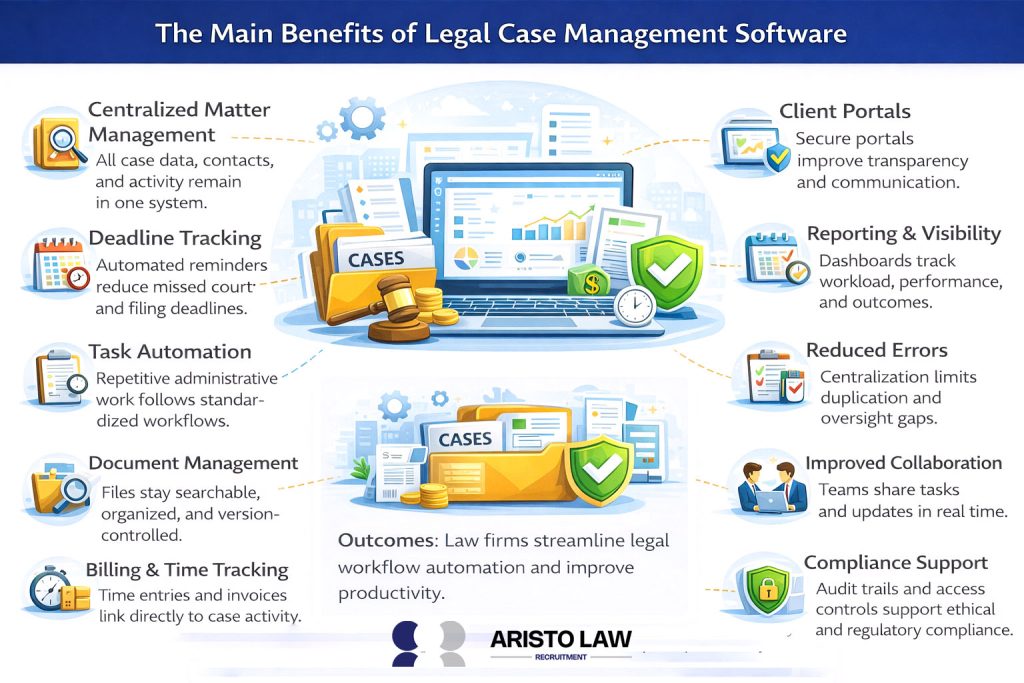
The main benefits of legal case management software include centralized matters, automated deadlines, client portals, reporting, reduced errors, stronger collaboration, and compliance support. Outcomes reflect the practical benefits of legal case management software as firms streamline legal workflow automation and improve law firm productivity.
Listed below are the 10 main benefits of legal case management software.
- Centralized matter management. All case data, contacts, and activity remain in one system.
- Deadline tracking. Automated reminders reduce missed court and filing deadlines.
- Task automation. Repetitive administrative work follows standardized workflows.
- Document management. Files stay searchable, organized, and version-controlled.
- Billing and time tracking. Time entries and invoices link directly to case activity.
- Client portals. Secure portals improve transparency and communication.
- Reporting and visibility. Dashboards track workload, performance, and outcomes.
- Reduced errors. Centralization limits duplication and oversight gaps.
- Improved collaboration. Teams share tasks and updates in real time.
Compliance support. Audit trails and access controls support ethical and regulatory compliance.
How do you choose the best case management software for a small law firm?
Small law firms choose the best case management software by defining needs, prioritizing must-have features, integrations, and support before full adoption.
Listed below are 9 steps for small law firms to choose the best case management software.
- Define needs. Identify workflows, practice areas, team size, and operational gaps.
- Set must-have features. Confirm requirements such as matter tracking, billing, client portal, and document management.
- Demo 2–3 tools. Evaluate usability, workflow fit, and feature depth.
- Test client portal. Review security, messaging, and document sharing experience.
- Check billing and payments. Assess invoicing, trust accounting, and payment processing.
- Verify integrations. Confirm compatibility with email, calendars, accounting, and productivity tools.
- Review pricing tiers. Compare costs, limits, and scalability as the firm grows.
- Confirm support and training. Evaluate onboarding, help resources, and response quality.
- Run a pilot. Test real cases to confirm reliability and fit before firm-wide rollout.
How much does legal case management software cost?
Legal case management software costs depend on subscription tiers, per-user pricing, feature depth, and optional add-ons rather than a single fixed price. Evaluating case management software cost for small firms involves reviewing tiered plans that bundle core features and charge per user, with higher tiers unlocking advanced reporting, automation, and integrations.
Legal software pricing often includes additional expenses for onboarding, data migration, staff training, third-party integrations, and payment processing fees. Total cost increases when firms require customization, expanded storage, or premium support, making long-term budgeting important.
What types of law firms benefit most from legal case management systems?
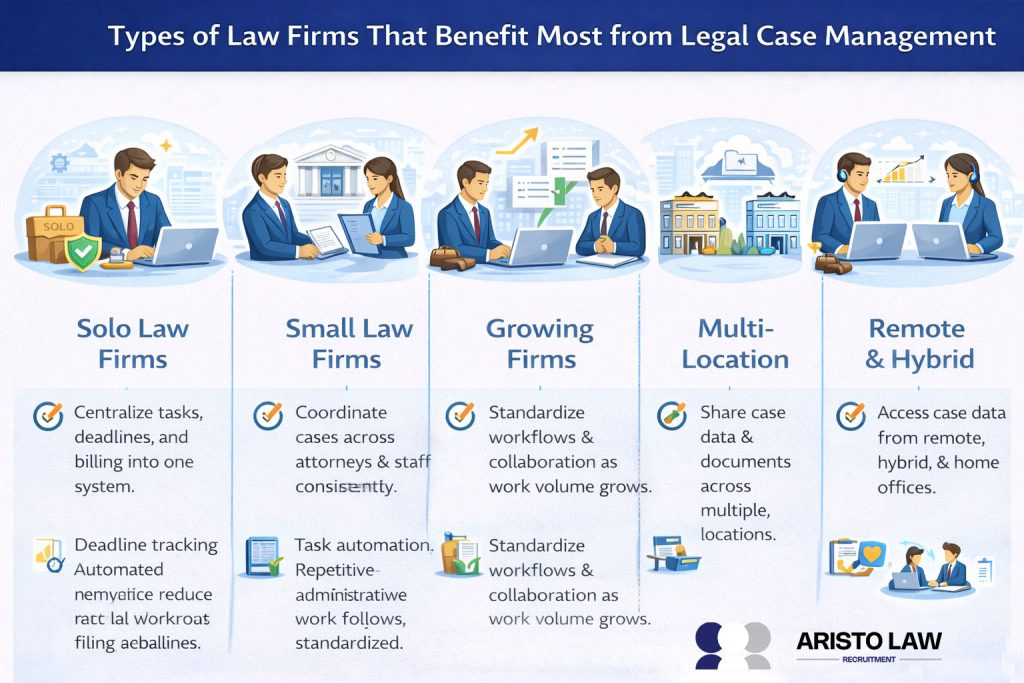
Law firms that handle multiple active matters, strict deadlines, and high client communication volume benefit most from legal case management systems. Solo law firms benefit by centralizing tasks, deadlines, documents, and billing in one system to manage limited administrative capacity. Small law firms benefit by coordinating caseloads across attorneys and staff while maintaining consistency, visibility, and compliance. Multi-attorney and growing firms benefit by standardizing workflows, improving collaboration, and reducing operational risk as matter volume increases. Law firms with remote teams or multiple locations benefit by sharing real-time access to case data, client communications, and documents across distributed environments. Law firms facing rising caseloads, frequent deadlines, and client responsiveness pressure will gain caseload efficiency through automation, centralized tracking, and structured workflow management.
What tasks do legal case management tools handle? Clio vs. MyCase?
Clio and MyCase both handle core case management tasks such as matter tracking, calendaring, document organization, billing workflows, and client communication.
Listed below are 7 task categories with how each platform supports key legal workflow tools.
- Matter management.
• Clio: Centralized matter records, custom fields, team roles, status tracking.
• MyCase: Unified case overview, matter notes, client activity timelines. - Deadlines and calendaring.
• Clio: Integrated calendar sync, automated alerts, court date reminders.
• MyCase: Built-in calendars, deadline flags, scheduled notifications. - Tasks and workflows.
• Clio: Task assignments, workflows, dependencies, recurring tasks.
• MyCase: Task lists, reminders, straightforward workflow tracking. - Document organization.
• Clio: Folder structures, versioning, searchable docs, template libraries.
• MyCase: Document storage, tagging, version control. - Billing and payments.
• Clio: Time tracking, flexible rates, trust accounting support, invoicing.
• MyCase: Time capture, integrated payments, invoice generation. - Client portal.
• Clio: Secure client access, messaging, document sharing.
• MyCase: Built-in portal with messaging, file exchange, and updates. - Reporting.
• Clio: Custom dashboards, performance analytics, exportable reports.
• MyCase: Standard reports on billing, activity, and caseload.
What agencies offer legal case management services?
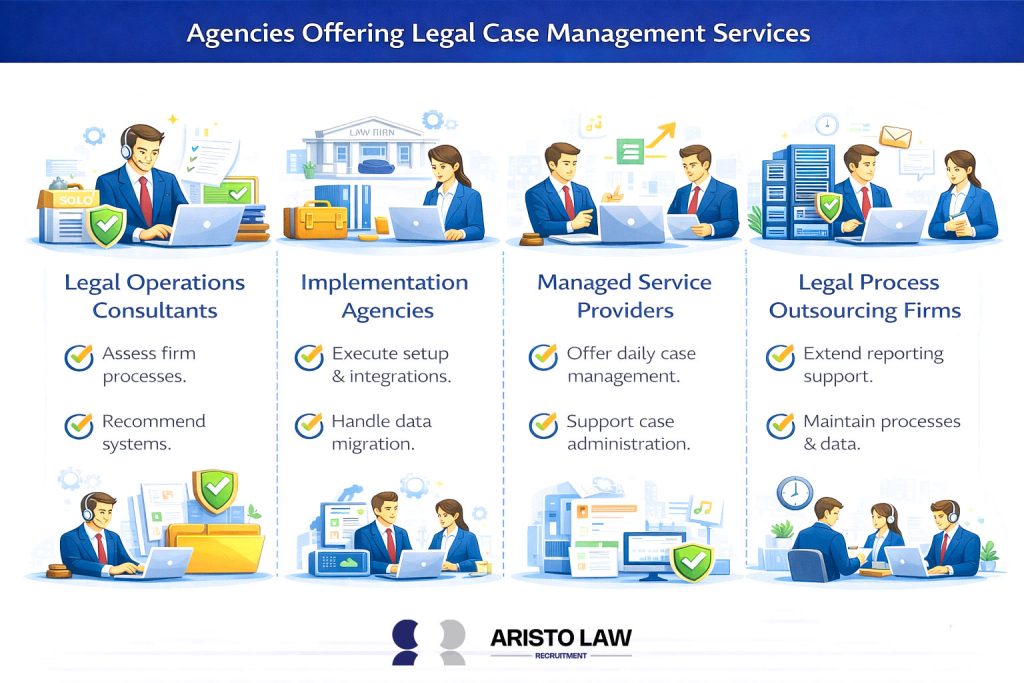
Legal case management services are provided by legal operations consultants, legal tech implementation agencies, managed service providers, and legal process outsourcing firms. Aristo Law legal case management services cover software configuration, data migration, workflow design, staff training, and ongoing administrative support. Implementation and service agencies differ from software providers by handling rollout, optimization, and daily usage rather than selling licenses. Legal operations consultants assess firm processes and recommend systems, while implementation agencies execute setup and integrations. Managed service providers and LPO firms extend support into day-to-day case administration, reporting, and process maintenance to sustain efficiency.
Which practice areas rely most heavily on case management software?
Practice areas that rely most heavily on case management software include personal injury, family law, employment law, estate planning, and real estate law.
Listed below are 8 Practice areas that rely most heavily on case management software.
- Personal injury law. High caseloads, medical records, deadlines, and frequent client communication.
- Family law. Ongoing filings, court schedules, sensitive communications, and document tracking.
- Immigration law. Form-intensive workflows and strict filing deadlines.
- Criminal defense. Court appearances, evidence handling, and rapid response needs.
- Civil litigation. Discovery volume, motion tracking, and deadline coordination.
- Employment law. Claims management, compliance documentation, and multi-party communication.
- Estate planning. Document version control and long-term client records.
- Real estate law. Transaction timelines, closing documents, and multi-party coordination.
How do virtual assistants use case management software?
Virtual assistants use case management software to manage matter data, track deadlines, coordinate tasks, assist with billing, and maintain workflow consistency. Virtual assistants deliver virtual assistant case management support by working directly within law firm systems to keep high-volume matters accurate, current, and compliant.
Listed below are the 8 Virtual assistants who use case management software.
- Matter management. Updating case records, contacts, and status notes.
- Deadline tracking. Monitoring court dates, filing deadlines, and reminders.
- Task coordination. Assigning, tracking, and following up on tasks.
- Document organization. Uploading, naming, tagging, and version-controlling files.
- Client communication support. Managing portal messages and document sharing.
- Billing assistance. Entering time, preparing invoices, and tracking payments.
- Reporting support. Generating caseload and billing reports.
- Workflow standardization. Applying consistent processes across matters.
Build a legal support team that moves work forward.
Tell us what is slowing your practice down. We will help map the role, workflow, and support structure that fits.