
Legal Document Automation: Software, Tools, and Comparison

Practical guidance for building efficient, accountable legal support operations.
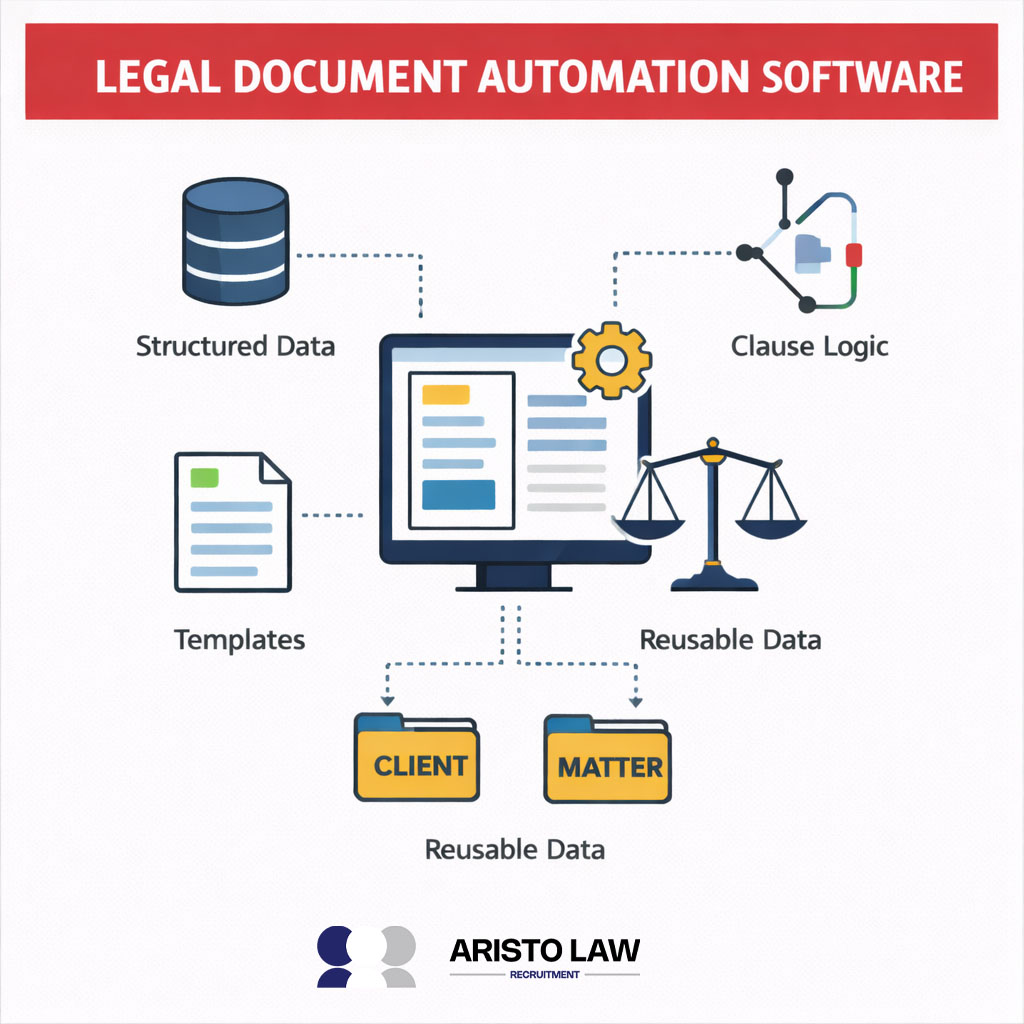
Legal document automation refers to the rule-based and AI-assisted generation of legal documents using structured data, templates, and logic rules. Legal document automation differs from document management because document management stores and organizes files, while automation generates documents dynamically from data inputs. Legal document automation in law firms operates through templates, clause libraries, conditional logic, and integrations with case management systems.
Legal document automation supports contracts, pleadings, NDAs, engagement letters, and compliance forms. Legal document automation software categories include document generation tools, template automation systems, document analysis platforms, and AI document automation solutions such as MyCase, Clio, NetDocuments, and Smokeball. Legal document automation features include clause banks, version control, workflow triggers, integration APIs, and compliance safeguards.
A study by Achachlouei et al., titled “Document Automation Architectures and Technologies: A Survey,” in 2021, found that document automation systems reduce manual effort and streamline document generation processes. Legal document automation benefits include efficiency gains, standardized outputs, and reduced drafting errors.
Legal document automation requires structured data fields, defined logic conditions, and change management planning. Legal document automation strategy varies between small firms seeking template speed and enterprise firms requiring scalable, secure, AI-driven workflows.
Aristolaw supports law firms with scalable legal workflow systems that reduce manual drafting. Modernize legal document processes with outsourced legal support from Aristolaw today. Aristolaw helps improve document standardization and strengthen operational productivity across legal teams.
What is legal document automation?
Legal document automation is the use of document automation software to generate legal documents from structured templates and predefined clauses. Legal document automation replaces manual drafting workflow steps by automatically populating names, dates, terms, and conditional provisions based on data inputs. Legal document automation applies logic rules to insert or exclude clauses within contracts, pleadings, and compliance forms.
Legal document automation increases drafting speed, enforces consistency across templates, and reduces the risk of human error in repetitive document creation.
What documents can be automated in a law firm?
The documents that can be automated in a law firm are contracts, engagement letters, NDAs, pleadings, intake forms, demand letters, and compliance documents.
Listed below are the 9 documents that are automated in a law firm.
- Client engagement letters: Templates populate client data, scope of representation, and fee terms.
- Non-disclosure agreements (NDAs): Clauses adjust based on jurisdiction, term length, and confidentiality scope.
- Service contracts: Contract templates insert pricing, deliverables, and termination provisions.
- Pleadings and court filings: Drafting workflow inserts party names, case numbers, and jurisdiction details.
- Client intake forms: Legal forms collect structured data for automated document population.
- Demand letters: Templates generate claims, damages summaries, and response deadlines.
- Compliance documents: Policy templates populate regulatory references and entity data.
- Settlement agreements: Clauses adjust based on payment structure and release scope.
- Employment agreements: Automated legal documents include compensation, duties, and confidentiality clauses.
How does document automation work in a law firm?
Document automation works in a law firm through intake data collection, template selection, clause logic application, draft generation, review, approval, and final export.
Listed below are the 7 steps of document automation in a law firm.
- Collect intake data: Law firm document automation begins with structured matter data such as client details, jurisdiction, dates, and financial terms.
- Select template: Drafting workflow assigns a predefined template aligned with the document type and practice area.
- Apply clause logic: Clause logic inserts or removes provisions based on conditional rules and matter data.
- Generate draft: Law firm document automation compiles populated fields and clauses into a formatted document.
- Review draft: Attorney review confirms accuracy, completeness, and compliance.
- Approve document: Approvals validate internal standards and client instructions.
- Export and send: System exports the final file and distributes it through email or the secure client portal.
Whaittware?
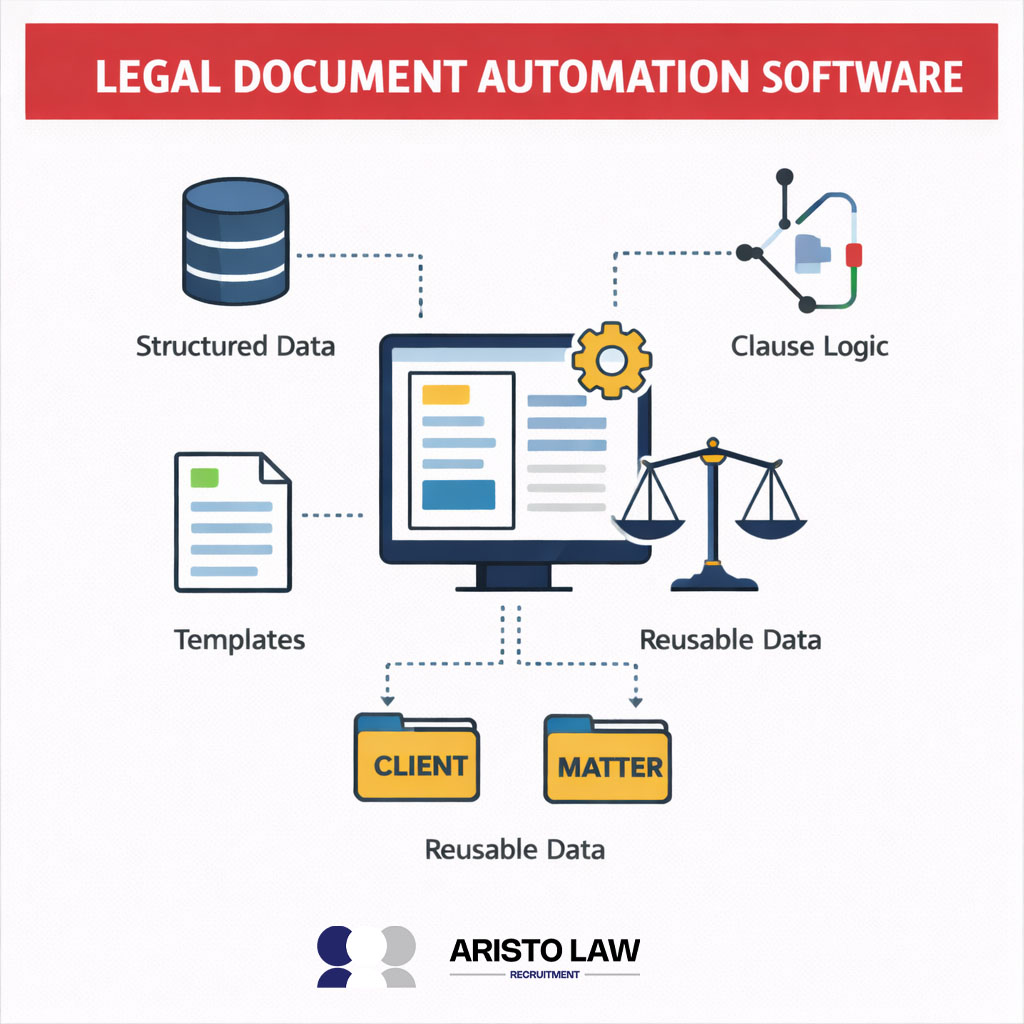
Legal document automation software is a legal tech system that generates documents through document assembly using structured data, templates, and clause logic. Legal document automation software differs from word processors because legal document automation software applies conditional rules and reusable data fields rather than relying on manual drafting, supported by structured legal document automation template support within firm workflows. Legal document automation software inserts or excludes clauses based on predefined logic and reuses client or matter data across multiple documents.
A study by Singh et al., titled “AI-Powered Legal Documentation Assistant,” found that AI-based drafting tools reduce time spent on contract preparation and document review tasks. Legal document automation software increases drafting speed, reduces repetitive errors, and enforces document consistency across practice areas.
What features should legal document automation software include?
Legal document automation software should include features such as template logic, clause libraries, data integration, workflow controls, and compliance safeguards.
Listed below are the 9 Legal document automation software.
- Template management system: Template management enables centralized control of standardized legal document formats across practice areas.
- Conditional template logic: Template logic applies rule-based conditions that insert or remove clauses based on structured matter data.
- Clause libraries: Clause libraries store approved provisions for reuse and ensure consistent drafting language.
- Reusable data fields: Reusable data allows client and matter information to auto-populate across multiple automated legal documents.
- System integration: Integration connects legal document automation with case management, CRM, and billing systems to reduce duplicate data entry.
- Workflow automation controls: Workflow tools trigger drafting, review, and approval steps based on predefined processes.
- Version control and audit trails: Version tracking records edits and preserves document history for accountability.
- Compliance management features: Compliance tools enforce jurisdiction-specific language and internal policy standards.
- Secure access controls: Permission settings restrict document editing and protect sensitive client information.
Legal document automation features collectively increase efficiency, standardize drafting output, and reduce the risk of manual errors within legal operations.
What are the best legal document software options?
The best legal document software options are those that match a firm’s drafting volume, collaboration needs, compliance requirements, and integration ecosystem. Best legal document software for small firms supports straightforward template creation, matter data reuse, and secure storage with minimal setup.
Best legal document software for mid-size teams includes clause logic, workflow automation, and version control to enforce consistency across practice areas. Best legal document software for large or enterprise workflows adds scalable collaboration tools, advanced data integration, and compliance controls that enforce jurisdictional rules and audit trails.
Best legal document software emphasizes ease of use, robust clause libraries, secure access controls, and connectivity with case management and billing systems to support efficient legal operations.
What is legal document analysis software?
Legal document analysis software reviews contracts and legal texts to identify risk flags, inconsistencies, and deviations from defined standards. Legal document analysis software performs contract review by scanning clauses, comparing language against approved clause libraries, and highlighting missing or non-compliant terms. Legal document analysis software generates outputs such as risk scores, redline suggestions, and clause consistency alerts to support attorney decision-making.
Legal document analysis software differs from document creation tools because legal document analysis software evaluates existing documents rather than generating new drafts from templates.
What is legal document generation software?
Legal document generation software is designed to create complete legal documents from structured templates and predefined variables. Legal document generation software uses document generation workflows that pull client and matter data into variable fields such as names, dates, payment terms, and jurisdiction details. Legal document generation software applies clause selection rules that insert or remove provisions based on responses to guided questions.
Legal document generation software produces formatted drafts in Word or PDF that attorneys review and finalize, which reduces manual drafting time and improves consistency across documents.
What is legal document template software?
Legal document template software helps legal teams create standardized drafting frameworks that automate repetitive document creation. Legal document template software structures firm templates with variable fields and formatting controls, supported by automated legal drafting templates embedded within internal workflows. Legal document template software enables attorneys to insert client data into predefined sections while preserving clause structure and numbering consistency.
Legal document template software maintains firm standards by centralizing approved language, formatting rules, and jurisdiction-specific provisions across practice areas.
What is law firm software in document automation workflows?
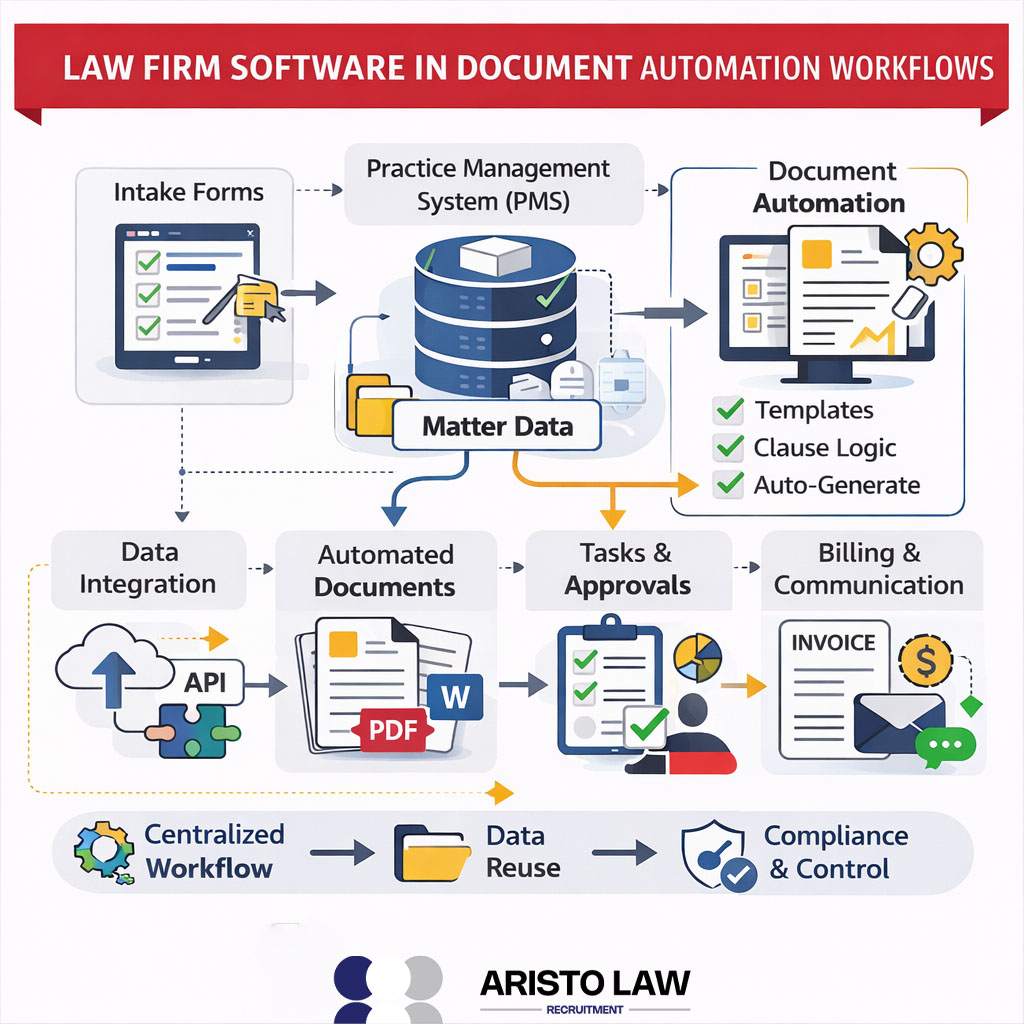
Law firm software in document automation workflows includes practice management systems, intake platforms, and document automation tools. Law firm software integrates intake forms with practice management databases to capture structured matter data at the start of representation. Law firm software enables matter data reuse across automated documents, billing records, and client communications to reduce duplicate entry.
Law firm software connects document automation workflows to task tracking, approvals, and compliance controls within a unified operational system.
Why do legal teams use document automation tools?
Legal teams use document automation tools to increase efficiency, enforce standardization, and reduce drafting risk within document workflows. Legal automation tools accelerate document preparation by populating templates with structured data instead of manual retyping.
Legal automation tools promote consistency by applying approved clauses and formatting rules across matters. Legal automation tools reduce human error and support workflow scalability as drafting volume increases across practice areas.
What are the best workflow automation tools for lawyers?
The best workflow automation tools for lawyers are intake automation systems, matter management platforms, document automation suites with workflow control, approval routing tools, and legal analytics dashboards. Workflow automation tools in legal tech environments align with structured legal workflow automation tools that integrate matter management and document processes.
Listed below are the 5 best workflow automation tools for lawyers.
- Intake automation platforms: Intake automation systems capture client data, perform conflict checks, and route qualified matters into case management queues.
- Matter management systems: Matter management platforms provide task templates, deadline tracking, and automated status updates across active cases.
- Document automation with workflow control: Document automation tools combine template logic with approval triggers and version tracking to standardize drafting workflows.
- Approval and notification systems: Approval tools automate internal review chains, send deadline reminders, and log audit trails for compliance.
- Analytics and reporting dashboards: Reporting tools track matter progress, turnaround time, and workflow bottlenecks to support operational oversight.
What should you compare when choosing document automation vendors?
When choosing document automation vendors, law firms should compare template flexibility, reporting visibility, support structure, cost model, and jurisdictional compliance coverage. Document automation evaluation requires a structured legal tech evaluation aligned with workflow needs.
Listed below are the 9 to compare when choosing document automation vendors.
- Template flexibility: Template flexibility determines how easily firm templates adapt across practice areas and document types.
- Conditional logic capability: Template logic depth defines how well the system handles complex clause variations and decision trees.
- Version control and audit trails: Version tracking ensures document history transparency and compliance accountability.
- Integrations with DMS, CRM, and PMS: Integration capability measures data exchange with document management, customer relationship management, and practice management systems.
- Security and permission controls: Security features protect client data through role-based access and encryption standards.
- Reporting and analytics: Reporting tools provide visibility into drafting volume, turnaround time, and workflow performance.
- Training and support services: Vendor support structure affects implementation success and user adoption.
- Cost structure: Pricing model clarity influences long-term return on investment and scalability planning.
- Jurisdictional compliance support: Compliance features ensure templates reflect region-specific legal standards and regulatory requirements.
What is the difference between document automation and document management?
The difference between document automation and document management is that document automation generates legal documents through templates and clause logic, while document management controls how documents are stored, organized, and secured throughout the document lifecycle. Document automation vs document management reflects two distinct stages of legal workflows: creation versus control.
The table below are The difference between document automation and document management.
| Aspect | Document Automation | Document Management |
| Core Function | Drafts and assembles documents using templates, variables, and clause logic | Stores, organizes, and secures documents after creation |
| Primary Purpose | Automates drafting and data population | Controls access, versioning, and retention |
| Workflow Stage | Creation stage of the document lifecycle | Storage and governance stage of the document lifecycle |
| Law Firm Example | Automatically generating an NDA from structured client data | Managing signed client files with permissions and search controls |
| Key Capabilities | Clause assembly, auto-population, and conditional rules | Search, permissions, version history, retention policies |
Document automation improves drafting speed, while document management ensures secure control and retrieval. Legal teams rely on both systems because document automation handles creation, and document management governs long-term storage and compliance.
Can document automation reduce drafting errors?
Yes, document automation can reduce drafting errors because document automation software applies standard templates and controlled clause libraries instead of manual retyping. Document automation software minimizes omissions by auto-populating required fields such as client names, dates, and defined terms from structured data. Document automation software reduces the risk of outdated language by pulling provisions from a centralized clause library rather than copying prior documents.
Document automation software strengthens quality control through consistent formatting and predefined logic rules, yet attorney review remains required before final execution to confirm legal accuracy and context suitability.
What inputs are required for automated legal documents?
The inputs required for automated legal documents are party names, client details, jurisdiction fields, dates, fee terms, contractual variables, and signature information.
Listed below are the 9 inputs required for automated legal documents.
- Party names: Full legal names of individuals or entities involved.
- Client details: Contact information and identifying matter data.
- Jurisdiction fields: Governing law and venue information.
- Effective and execution dates: Start dates, deadlines, and signature dates.
- Fee terms: Billing structure, rates, and payment schedules.
- Scope of services: Defined legal services covered in the document.
- Matter type: Practice area classification that drives clause selection.
- Contractual variables: Payment amounts, notice periods, or settlement figures.
- Signature information: Authorized signatories and titles for execution formatting.
What legal teams benefit most from document automation?
Legal teams that handle high-volume, standardized drafting benefit most from document automation, including law firms, in-house legal teams, and compliance teams. Legal document automation improves efficiency in law firms that produce recurring contracts, pleadings, and engagement letters.
In-house legal teams gain speed and consistency in vendor agreements and policy documents. Compliance teams gain stronger standardization and audit control in regulatory filings and internal documentation workflows.
Can small law firms use document automation effectively?
Yes, small law firms can use document automation effectively because document automation for small law firms reduces repetitive drafting time and administrative workload. Document automation for small law firms works best when firms start with a simple workflow first and automate only high-volume templates such as engagement letters or NDAs.
Document automation for small law firms improves efficiency by reusing client data across multiple documents instead of manual entry. Document automation for small law firms creates a scalable workflow that expands gradually as template libraries and clause logic mature.
What is efficient law firm document automation?
Efficient law firm document automation is a structured drafting system that uses high-quality templates, precise clause logic, and integrated matter data to produce accurate documents with minimal manual effort. Efficient law firm document automation depends on well-designed templates that reflect firm standards and jurisdiction requirements. Efficient law firm document automation applies clause logic that inserts correct provisions based on defined variables and matter inputs. Efficient law firm document automation connects integrations and approval workflow controls to ensure data accuracy, version consistency, and governed review before final release.
What is document automation for a large law firm?
Document automation for a large law firm focuses on governance, centralized clause libraries, and controlled multi-office consistency. Document automation for a large law firm enforces standardized templates and clause libraries that align with firm-wide compliance policies.
Document automation for a large law firm applies permission controls and approval workflows to regulate drafting authority across practice groups and jurisdictions. Document automation for a large law firm integrates with practice management systems to reuse matter data while preserving audit trails and version control. Document automation for a large law firm supports consistent document output across offices without removing attorney oversight.
What is AI document automation software?
AI document automation software is a legal technology system that combines rule-based document assembly with AI drafting assistance and clause suggestions. AI document automation software differs from traditional automation because AI document automation software analyzes context, recommends clause language, and adapts wording based on prior documents, as described within AI-powered document automation for law firms’ workflows.
AI document automation software supports automation by generating draft language and identifying missing provisions while still relying on structured templates and data inputs. AI document automation software requires an attorney’s legal review before final use to confirm accuracy, compliance, and contextual suitability.
What is the best AI software for automating legal document creation?
The best AI software for automating legal document creation is one that balances strong guardrails, executable outputs, robust template libraries, permissions controls, and seamless integrations. Best AI software for automating legal document creation prioritizes AI drafting suggestions that cite sources or logic paths so attorneys understand how language is generated.
Best AI software for automating legal document creation includes customizable templates with variable fields and clause logic that enforce firm standards. Best AI software for automating legal document creation supports permission levels and approval workflows so reviewers and partners retain control over final language. Best AI software for automating legal document creation integrates with practice management, CRM, and document management systems to reuse matter data and maintain version history.
Can document automation support vendor compliance workflows?
Yes, document automation can support vendor compliance workflows because document automation applies standardized clause libraries, structured approvals, and recorded audit trails. Document automation vendor compliance benefits include automatic insertion of approved compliance language from a centralized clause library.
Document automation routes vendor agreements through defined approvals before signature, which reinforces internal compliance checks. Document automation logs changes, timestamps, and user actions within an audit trail that supports documentation oversight. Document automation improves consistency across vendor contracts while preserving attorney and compliance review responsibility.
What are the best practices for implementing document automation in a law firm?
The best practices for implementing document automation in a law firm are prioritizing high-volume templates, training users, structuring rollout, and tracking performance metrics.
Listed below are the 8 best practices for implementing document automation in a law firm.
- Prioritize high-volume templates: Law firm document automation begins with repetitive documents that consume the most drafting time.
- Establish clause governance rules: Template governance assigns responsibility for approved language and jurisdiction updates.
- Standardize template architecture: Consistent variable fields and formatting improve drafting reliability.
- Implement version control procedures: Versioning prevents outdated templates from circulating across teams.
- Configure approval workflows: Approval routing ensures oversight before document release.
- Deliver structured training: Training aligns attorneys and staff with new drafting workflows.
- Plan phased rollout schedule: Rollout strategy introduces automation by practice area to reduce disruption.
- Track metrics and maintain feedback loop: Metrics tracking measures efficiency gains while feedback improves template performance.
How can legal teams measure ROI gains from document automation?
Legal teams can measure ROI gains from document automation by tracking time savings, cost reductions, workflow productivity, and error reduction across repeatable drafting processes. ROI measurement compares hours reduced per document against attorney billing rates or staff cost to quantify document automation savings.
ROI measurement evaluates lower outside counsel spend when internal teams handle standardized contracts through automated workflows. ROI measurement reviews contract turnaround time and throughput increases to determine workflow productivity improvements.
Listed below are the Main 7 ways Legal teams measure ROI gains from document automation.
- Hours reduced per document
- Cost per document drafted
- Contract turnaround time
- Staff utilization rate
- Number of drafting errors or revisions
- Compliance deviation incidents
- Document output volume per month
Qualitative outcomes include stronger consistency, standardized language control, and reduced drafting risk. ROI measurement shows the strongest impact in repeatable workflows such as NDAs, engagement letters, and routine contracts, where automation scales productivity gains.
Can MyCase automation support document workflows?
Yes, MyCase automation can support document workflows because MyCase automation connects matter data with document processes inside a law firm software environment. MyCase automation assists document workflows by linking client intake information to drafting tasks and document records.
MyCase automation effectiveness depends on how the automation setup aligns with the firm-specific workflow structure and document complexity. Law firms should validate integration capabilities, template support, and approval routing needs before relying on MyCase automation for structured document workflows.
Build a legal support team that moves work forward.
Tell us what is slowing your practice down. We will help map the role, workflow, and support structure that fits.