
Legal Workflow Automation: Tools, Benefits, and Examples

Practical guidance for building efficient, accountable legal support operations.
Legal workflow automation streamlines and optimizes legal processes by automating repetitive tasks, enhancing productivity, and reducing human error. Unlike workflow management, which focuses on organizing and tracking tasks, workflow automation employs software to execute Automated tasks automatically, including litigation workflows. Key tools for legal workflow automation include Clio, NetDocuments, Smokeball, Actionstep, Litify, and enterprise legal management platforms, which integrate document management, billing, and case tracking.
Examples of legal workflows suited for automation are intake, document generation, approvals, request tracking, billing, and case management. Automated tasks include document drafting, contract review, and client communication. Core features include task routing, rule-based triggers, document automation, integrations, dashboards, and compliance controls. Automation reduces errors, accelerates turnaround times, and ensures standardized processes.
Scientific data shows that legal workflow automation achieves ROI, cost savings, productivity gains, and error reduction. A study by Gour and Gour titled “Law Firm Profitability and Financial Strategies” in 2025 examined how law firms are adopting automation and other technologies like AI and data analytics to enhance operational efficiency.
When selecting workflow solutions, factors like software integration, scalability, and user-friendly interfaces are critical. Best practices for successful implementation include proper change management, smooth AI integration, and seamless adaptation to remote work models.
Aristolaw helps law firms improve operational efficiency. Improve legal workflow organization, task automation, and operational consistency with outsourced legal support from Aristolaw. Aristolaw helps with legal workflow automation support, case management coordination, and outsourced legal staffing solutions.
What is legal workflow automation?
Legal workflow automation is the use of software to streamline and automate repetitive legal tasks based on predefined rules and triggers. Unlike AI, which uses predictive or generative models to analyze and make decisions, legal workflow automation relies on rules-based systems that execute tasks according to set instructions.
For example, legal workflow automation handles intake, where client information is automatically captured and routed, approvals, where documents or requests are automatically processed, and deadlines, where tasks are tracked and reminders are sent to ensure timely action. Legal workflow automation supports workflow standardization and improves efficiency by reducing human error and manual intervention.
What are legal workflow automation tools?
Legal workflow automation tools or software are digital solutions that streamline and automate legal processes across various practice areas. Legal workflow automation tools for legal workflow automation cover categories such as case management workflows, which help law firms track and manage tasks within legal matters, intake systems that automate client onboarding and data capture, document automation, which generates standardized legal documents based on templates, and contract lifecycle management (CLM), which automates contract creation, review, and tracking. Legal workflow automation tools integrate within the legal tech stack to improve efficiency, reduce manual tasks, and enhance collaboration throughout the legal process.
What are the benefits of legal workflow automation?
The benefits of legal workflow automation are improved speed, reduced errors, and enhanced consistency across legal processes. Automation improves legal efficiency by streamlining operations, ensuring better tracking, and enabling greater compliance control.
Listed below are the 12 benefits of legal workflow automation.
- Increased speed in completing repetitive tasks and processing legal workflows
- Fewer errors due to reduced manual input and more precise execution
- Consistency in document drafting, approvals, and legal processes
- Improved tracking of case progress, deadlines, and key actions
- Enhanced compliance through automated checks and regulatory updates
- Cost control by reducing overhead and optimizing resource allocation
- Better scalability for handling increased case volumes without additional staff
- Greater transparency for clients and internal teams via real-time updates
- Standardization of legal processes, reducing variability and risk
- Faster decision-making with real-time data insights and performance metrics
- Resource optimization by allowing staff to focus on high-value tasks
- Improved client satisfaction through faster response times and efficient service
What are examples of legal workflows?
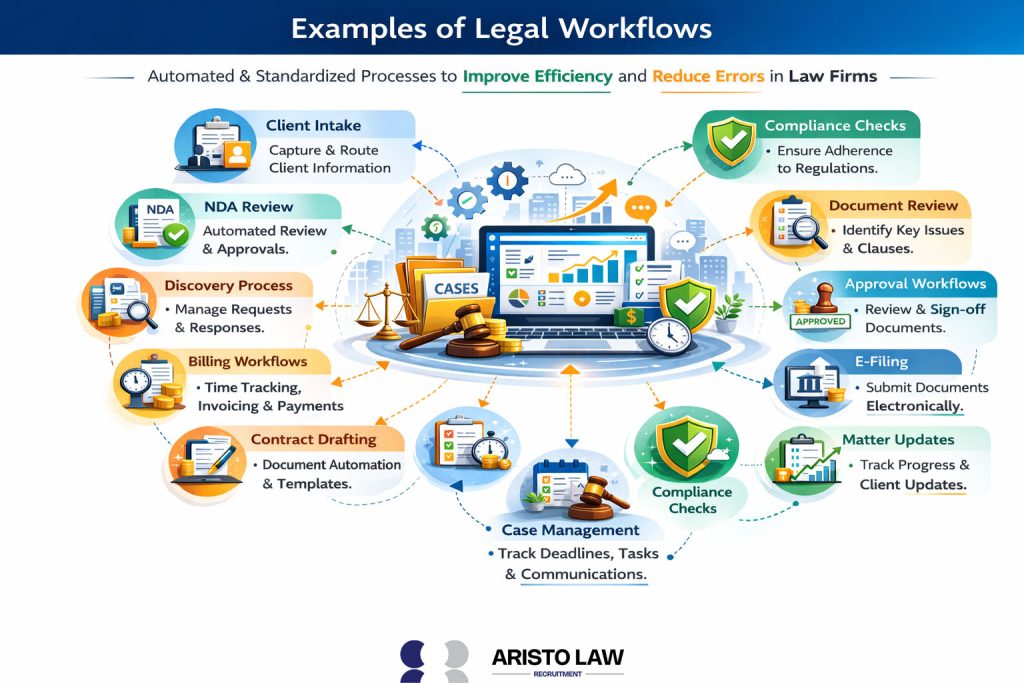
Examples of legal workflows are processes that automate and standardize tasks within law firms to enhance efficiency and reduce errors. Legal workflows span various legal functions to support smoother operations.
Listed below are the 12 Examples of legal workflows.
- Client intake for capturing and routing client information
- Conflict checks to ensure no potential legal conflicts in representation
- NDA review automates the review and approval of non-disclosure agreements
- Discovery process for managing document requests and responses during litigation
- Billing workflows for time tracking, invoicing, and payment processing
- Contract drafting using document automation to create standard agreements
- Case management for tracking deadlines, tasks, and client communications
- Compliance checks to ensure adherence to industry regulations
- Document review automating the identification of key issues or clauses
- Approval workflows for reviewing and signing off on legal documents
- E-filing for submitting court documents electronically
Matter updates for tracking case progress and managing client expectations
What are the best legal workflow automation tools?
The best legal workflow automation tools are those that support core legal processes like practice management and intake, based on integration capabilities and automation features.
Listed below are the 10 best legal workflow automation tools.
- Practice management platforms for automating matter tracking, deadlines, and task workflows
- Contract lifecycle management (CLM) systems for automating contract creation, review, and renewal
- Document automation solutions for generating standardized legal documents from templates
- Intake and client onboarding tools for capturing and routing new client data
- Billing and time capture systems for automating invoicing and revenue tracking
- Case and matter routing workflows for task sequencing and assignment
- Approval and review workflows for rule-based document sign-offs
- Compliance monitoring tools for checking regulatory requirements within workflows
- Integration connectors linking court filing, email, and document systems into automated flows
- Analytics dashboards for tracking workflow performance and identifying bottlenecks
How to compare legal workflow automation software?
Legal workflow automation software is compared using workflow fit, security, integrations, and ROI criteria.
Listed below are the 5 steps to compare legal workflow automation software.
- Map workflows to identify key processes that need automation and alignment with software capabilities.
- Shortlist software options based on features, user reviews, and fit with the firm’s operational needs.
- Request demos to evaluate the software’s user interface, features, and ease of implementation.
- Run a pilot with selected software to test its performance in real-world legal tasks and workflows.
- Review ROI by measuring improvements in efficiency, cost savings, error reduction, and user satisfaction.
What features should legal workflow automation software include?
Effective legal workflow automation software includes Permissions for controlling user access, Audit logs for tracking changes, Templates for automating documents, and important features that enhance task management, compliance, and operational efficiency.
Listed below are the 15 Effective legal workflow automation software.
- Permissions for controlling user access and role-based tasks
- Audit logs for tracking changes, approvals, and actions taken in workflows
- Templates for automating document generation and standardizing content
- Service level agreements (SLAs) for tracking deadlines and performance targets
- Integrations with other systems, such as DMS, billing, and client portals
- Dashboards for visualizing workflow performance and key metrics
- Version control to track document changes and revisions
- Automated notifications for reminders and updates on task progress
- Task routing for automatically assigning tasks based on predefined rules
- Data encryption for ensuring confidentiality and secure data storage
- Client portal integration for client communication and document sharing
- Customizable workflows to adapt to specific firm needs and practices
- Reporting capabilities for generating real-time reports on case progress and team performance
- Templates for contracts to streamline contract lifecycle management
- Collaboration tools for team-based document editing and approvals
What is a legal workflow management system?
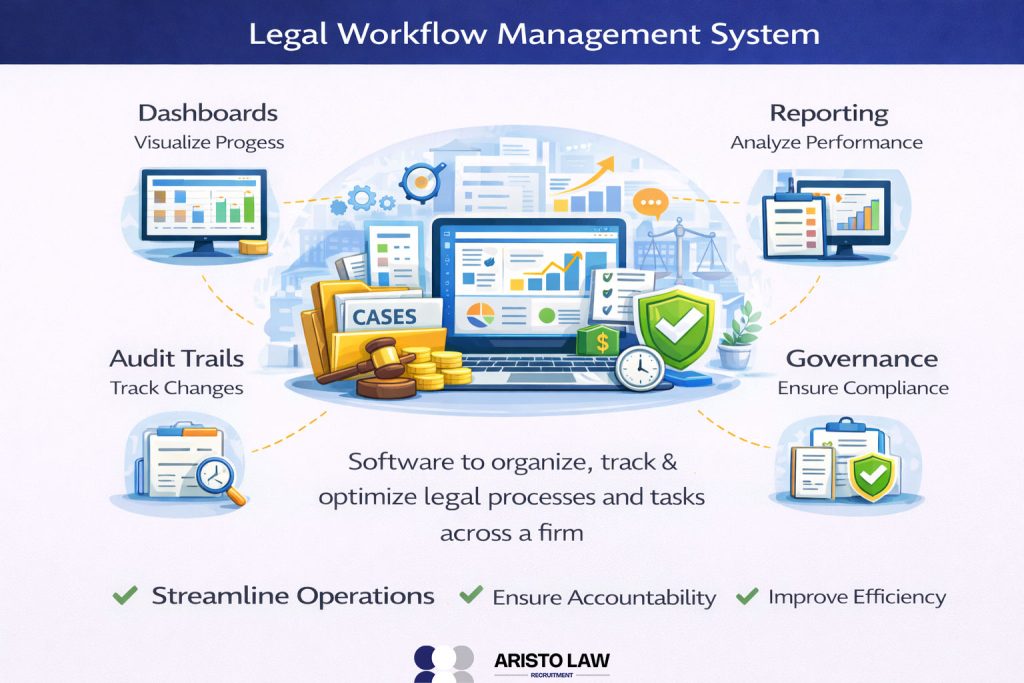
A legal workflow management system is a software platform designed to organize, track, and optimize legal processes and tasks across a firm. legal workflow management systems offer important features such as Legal workflow management systems that include dashboards for visualizing progress, audit trails for tracking document changes and user actions, reporting tools for performance analysis, and governance frameworks to ensure compliance with internal policies and regulations. Legal workflow management systems help law firms streamline operations, ensure accountability, and improve efficiency in case management and task execution.
What legal processes are best for automation?
Legal processes are best suited for tasks that are repetitive, rules-based, and require consistency, with over 60% of Legal processes benefiting from automating legal processes and document workflows.
Listed below are the 8 Legal processes that are best for automation.
- Client intake for capturing and processing new client information
- NDA review for automating the creation and approval of non-disclosure agreements
- Billing for automating time tracking, invoicing, and payment processing
- Reminders for tracking deadlines, meetings, and important actions
- Compliance checklists for ensuring adherence to legal and regulatory requirements
- Document generation for creating standard forms and contracts from templates
- Approval workflows for managing document reviews and sign-offs
- Case management updates for tracking status and assigning tasks automatically
What is legal workflow management software?
Legal workflow management software is a tool designed for overseeing, optimizing, and monitoring legal processes, focusing on governance, compliance, and performance rather than just task execution. Unlike basic workflow software, legal workflow management software offers management capabilities such as dashboards for real-time workload visibility, audit trails for tracking actions, SLA tracking to monitor deadlines, detailed reporting features for data-driven decision-making, and performance monitoring to ensure workflow efficiency.
Legal workflow management software is particularly valuable for legal operations leaders and firm management, helping them track progress, maintain oversight, and ensure that legal workflows align with business objectives and compliance standards.
What are the legal workflow solution selection criteria?
Legal workflow solution selection criteria are Flexibility, Security, and Scalability, a set of factors that help determine the best software for automating and managing legal processes. Legal workflow factors align with the best practices for implementing workflow automation, which ensure seamless integration and optimization within a firm’s specific needs.
Listed below are the 5 main Legal workflow solution selection criteria.
- Flexibility to adapt to the firm’s specific workflow needs
- Security measures to protect sensitive client and firm data
- Scalability to support growth and increased case volume
- Cost relative to the software’s capabilities and the firm’s budget
- Support options for troubleshooting, training, and ongoing assistance
What are the best practices for implementing workflow automation in a law firm?
Successful workflow automation depends on pilot testing, staff training, clear ownership, measurable metrics, and security governance. Legal teams apply virtual assistants in implementing legal automation within structured rollout plans that support adoption and operational control.
Listed below are the 9 Successful workflow automation.
- Pilot first to validate workflows before full deployment
- Training programs to ensure consistent staff adoption
- Clear ownership through assigned legal ops leadership
- Defined metrics tracking cycle time, errors, and throughput
- Security review protecting confidentiality and access controls
- Workflow mapping aligning automation with firm processes
- Change management supporting user transition and accountability
- Integration planning connecting billing, DMS, and case systems
- Approval governance enforces review steps and audit trails
What are the most automated legal tasks in workflow automation?
Automated legal tasks are repetitive, rules-based activities that are streamlined for efficiency, such as reminders, assignments, and document generation. Automated legal tasks include most automated legal tasks and workflow solutions for tasks like managing deadlines, distributing tasks, creating standard legal documents, and capturing client or case data.
Listed below are the 5 automated legal tasks.
- Reminders for deadlines, filings, and appointments
- Assignments for task distribution and team coordination
- Document generation for creating standard contracts, forms, and agreements
- Data capture for client intake or document information extraction
- Contract review for scanning documents for predefined clauses and terms
What is the ROI of legal workflow automation?
The ROI of legal workflow automation is measured through time savings, error reduction, and increased legal capacity. Main ROI metrics include cycle time, which tracks the time saved in completing tasks, cost per matter, which reflects the efficiency gained in managing legal matters, and utilization, which measures the increased capacity to handle more cases or clients without additional resources.
ROI metrics state how workflow automation improves operational efficiency and optimizes resource allocation in legal operations.
Can workflow automation reduce errors in legal processes?
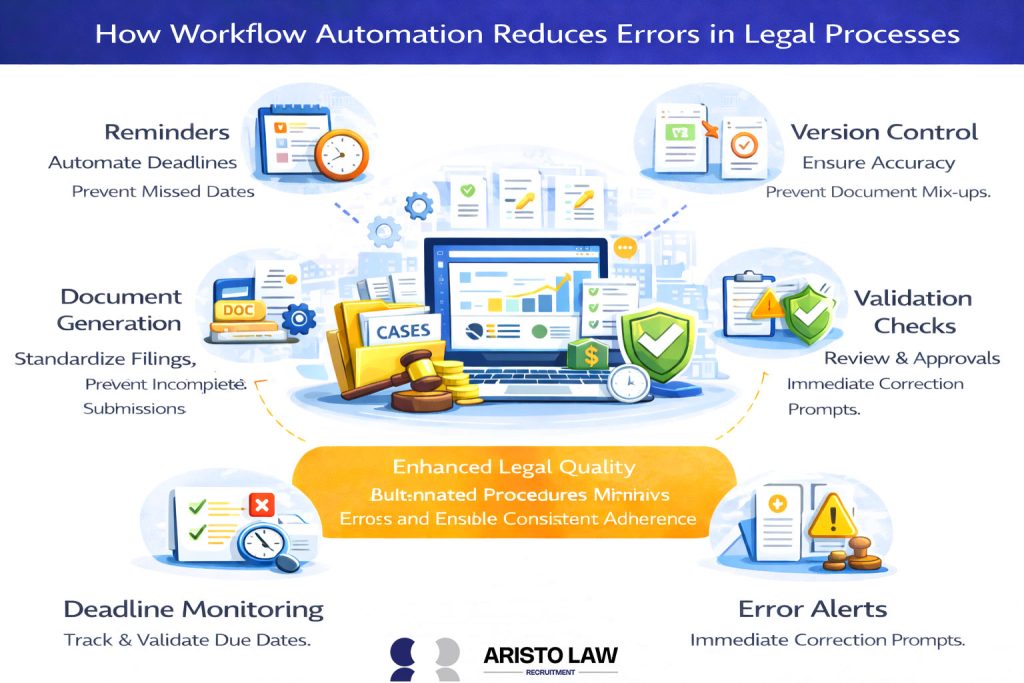
Yes, workflow automation can reduce legal errors by minimizing human mistakes in repetitive tasks and ensuring consistent adherence to procedures. Workflow automation reduces errors such as missed deadlines, wrong document versions, and incomplete filings by automating reminders, version control, and document generation. Automation systems include built-in validation checks and approval workflows to verify accuracy and ensure compliance before actions are finalized, enhancing overall legal quality.
Can workflow automation improve turnaround time for legal matters?
Yes, workflow automation can improve turnaround time by reducing cycle time through faster routing, automated reminders, and parallel reviews. Automation accelerates tasks by eliminating delays in document processing, approval workflows, and task assignments. By streamlining workflow automation processes, automation also speeds up client response time, allowing law firms to deliver quicker results and meet deadlines more efficiently.
Can workflow automation improve request tracking in legal teams?
Workflow automation improves request tracking by organizing and streamlining the intake process, monitoring progress, and ensuring timely responses. Automated systems create intake queues that categorize and prioritize incoming requests, while SLAs set expectations for response times.
Dashboards provide real-time visibility into request statuses, and escalation rules ensure that delayed or high-priority requests are promptly addressed. Workflow automation structure enhances accountability and ensures that legal teams manage and respond to client needs.
Build a legal support team that moves work forward.
Tell us what is slowing your practice down. We will help map the role, workflow, and support structure that fits.