
How to Manage Email for Lawyers

Practical guidance for building efficient, accountable legal support operations.
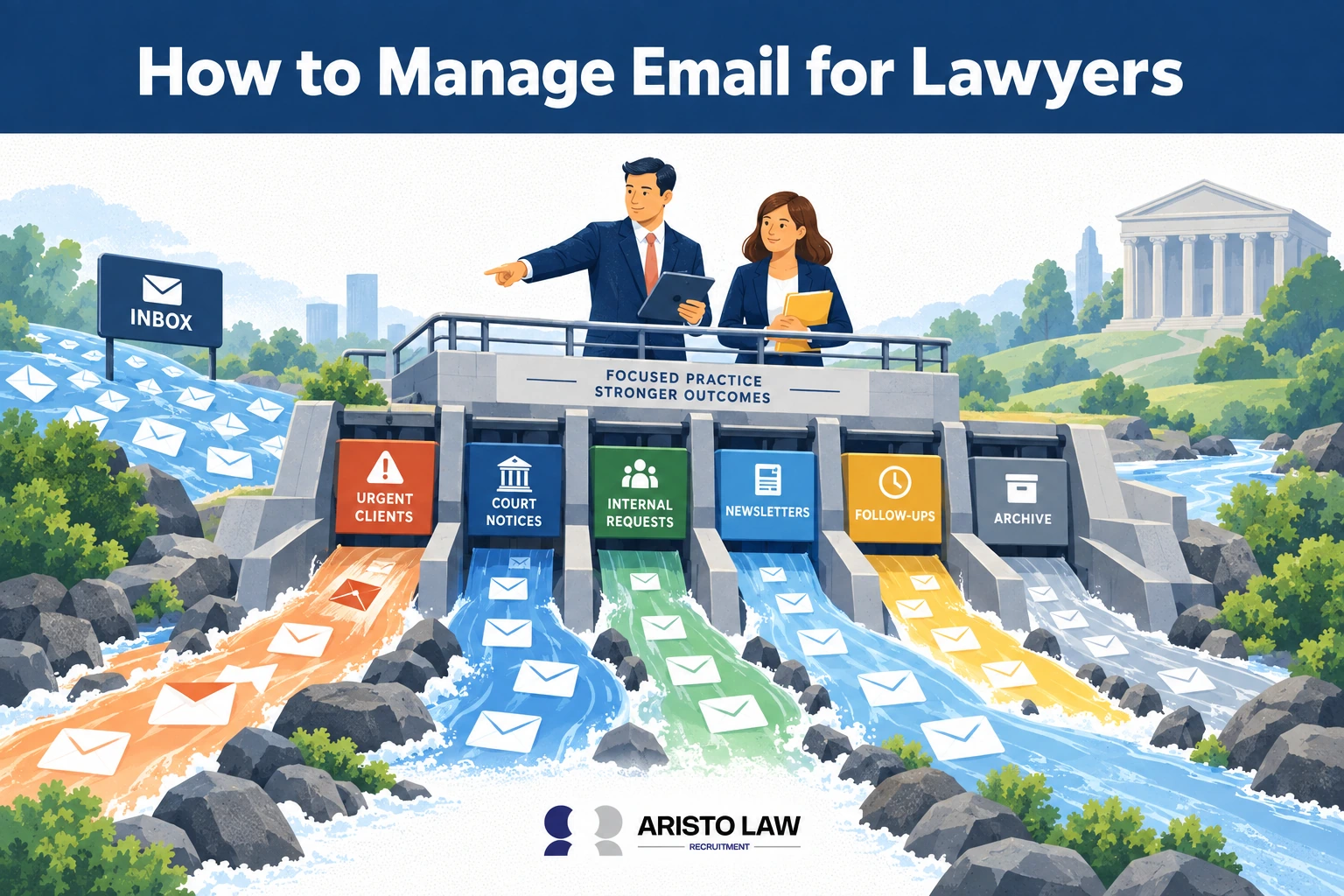
To effectively manage email for lawyers, a legal assistant or
VA disables notification popups to reduce distractions, processes
messages in scheduled batches, and files correspondence by
matter. A legal assistant or VA also integrates email with
practice management and document management systems and standardizes
folder structures.
Effective legal email management also includes automating inbox
rules, using text snippets for routine responses, encrypting
confidential attachments, enforcing multi-factor authentication and
access controls, applying consistent naming conventions, auditing
retention policies, delegating administrative sorting, archiving
completed matters, and writing concise, actionable emails. Document
management systems strengthen email management by automatically linking
messages to client matters, maintaining version control, improving
searchability, supporting compliance requirements, and creating complete
audit trails.
Law firms use secure email platforms, legal document management
systems, practice management software, workflow automation tools, email
archiving platforms, CRM systems, encryption software, and productivity
applications to manage communications efficiently. An ethics
analysis by the Michigan State Bar in 2026, titled Cybersecurity and the
Lawyer’s Duty: Client Protection in the Digital Age, states that lawyers
are ethically mandated to use secure communication methods like email
encryption and specialized portals when transmitting sensitive client
data to prevent unauthorized interception and preserve the
attorney-client privilege. Selection should prioritize
security, compliance, automation, document integration, search
functionality, scalability, mobile access, reporting, and ease of use.
Most legal email management software follows per-user subscription,
tiered pricing, or enterprise licensing models with additional
implementation and support costs.
Aristo Law is a Legal Process Outsourcing company that helps
law firms manage email for lawyers by providing outsourced Virtual Legal
Assistant support for inbox organization, client message triage,
follow-up tracking, appointment coordination, document routing, and
attorney communication workflows. Hire a
Virtual Legal Assistant with Aristo Law. Aristo Law connects law
firms with outsourcing solutions that match trained virtual legal
assistant staff to each email management task, client response workflow,
follow-up duty, document routing function, and attorney productivity
need.
Listed below are ways to manage lawyer emails.
-
1. Disable notification popups: Lawyers disable
notification popups to reduce interruptions during legal drafting,
client calls, research, and case analysis. -
2. Batch process communications: Lawyers process
emails in scheduled time blocks to control inbox volume and reduce
constant context switching. -
3. File matter correspondence: Lawyers file email
correspondence under the correct client, case, matter number, or
litigation folder for easier retrieval. -
4. Integrate practice software: Lawyers connect
email with practice management and document management systems to keep
messages, documents, deadlines, and matter records aligned. -
5. Standardize folder hierarchies: Lawyers use
consistent folder structures for clients, matters, courts, opposing
counsel, billing, discovery, and closed files. -
6. Automate email rules: Lawyers use inbox rules to
route court notices, client updates, billing messages, newsletters, and
internal communications into the right folders. -
7. Utilize text snippets: Lawyers use saved text
snippets for routine replies, scheduling messages, intake responses,
document requests, and follow-up emails. -
8. Encrypt sensitive attachments: Lawyers encrypt
confidential attachments to protect privileged client records,
contracts, financial documents, medical records, and litigation
files. -
9. Apply confidentiality controls, MFA, and access
permissions: Lawyers use confidentiality settings, multi-factor
authentication, and role-based access permissions to reduce unauthorized
access to legal communications. -
10. Enforce naming conventions: Lawyers apply
consistent subject lines and file names so emails, attachments, and
matter records remain searchable. -
11. Audit inbox retention: Lawyers review retention
rules to confirm that emails are stored, deleted, archived, or preserved
according to firm policy and legal obligations. -
12. Avoid multitasking during email blocks: Lawyers
avoid multitasking during email blocks to improve response accuracy,
reduce missed instructions, and protect legal judgment. -
13. Delegate administrative sorting: Lawyers
delegate non-legal sorting tasks to legal assistants or virtual legal
administrative staff to keep attorney time focused on legal work. -
14. Archive resolved files: Lawyers archive emails
from completed matters to reduce inbox clutter and preserve closed case
correspondence. -
15. Streamline message length: Lawyers write concise
emails with clear requests, deadlines, next steps, and required
attachments to reduce back-and-forth communication.
1. Disable notification popups
Disabling notification popups removes continuous
interruptions that reduce attorney productivity and increase the risk of
overlooking important legal work. Combined with practice
management software and matter-centric filing, scheduled email review
supports stronger organization while protecting client
confidentiality.

Notification management allows lawyers to process email during
scheduled periods instead of reacting to every incoming message,
improving concentration, response quality, and workflow efficiency.
A study by the University of California, Irvine in 2025, titled
Constant Digital Interruptions: The Hidden Impact on Lawyer Wellbeing,
states that it takes an average of 23 minutes to regain deep focus after
being distracted by a single minor notification popup. Best
practice includes disabling desktop and mobile popups, scheduling
dedicated email blocks, and prioritizing urgent matters through
predefined rules.
2. Batch process
communications
Batch processing communications means reviewing and
responding to email during designated time blocks instead of
continuously throughout the day. Scheduled processing reduces
context switching, improves response consistency, strengthens
prioritization, and limits email overload.
Workflow automation and matter management systems help organize
messages by urgency and legal matter. Research by MyCase in
2025, published in the report Automated Legal Intake: How to Use AI to
Enhance the Process, states that integrating advanced automation
frameworks into case management tools allows firms to contextually
screen client inquiries, automatically flag high-urgency notifications,
and immediately route critical updates for real-time legal
response. Best practice includes checking email at predefined
intervals and processing similar communications together.
3. File matter correspondence
Filing matter correspondence organizes emails under the
correct client or legal matter to maintain complete case records and
improve document retrieval. Matter-centric filing supports
compliance, strengthens audit trails, improves collaboration, and
reduces misplaced communications.
Practice management software and document management systems automate
filing while preserving version history. A legal infrastructure
analysis by Legaltech Hub in 2025, titled Document Management Systems
(DMS) for Law Firms, states that practice and document management
integrations automatically route and file incoming client documents
directly into dedicated, matter-centric folders based on email metadata
and sender identification, removing the need for manual staff
sorting. Best practice includes assigning every client email to
the appropriate matter immediately after processing.
4. Integrate practice
management software
Integrating practice management software connects email with
case management, calendaring, document storage, billing, and client
records to centralize legal operations. Integration eliminates
duplicate data entry, improves collaboration, and provides attorneys
with complete matter visibility.
Managing email for lawyers requires practice software that connects
client emails, case records, deadlines, billing notes, and task
ownership inside one legal workflow. Managing email for lawyers improves
when legal
case management systems assign each email to the right
matter, responsible attorney, client timeline, and next legal
action.
A legal infrastructure analysis by Legaltech Hub in 2025,
titled Legal Practice Management Systems (LPMS), states that modern law
firm software acts as a unified platform that binds billing, matter
tracking, calendaring, and internal communication systems into a single
centralized database to streamline entire legal operations.
Best practice includes selecting software with native email integration
and synchronizing communications automatically.
5. Standardize folder
hierarchies
Standardizing folder hierarchies creates a consistent
structure for organizing client, administrative, billing, court, and
internal communications. Uniform organization reduces search
time, improves collaboration, and supports document retention
policies.
A data management study by the International Legal Technology
Association (ILTA) in 2025, titled The State of Legal Technology and
Information Governance, states that implementing uniform, firm-wide file
organization and standardized naming conventions reduces document search
time by up to 35%, eliminating the operational drain of hunting for
misfiled case records. Best practice includes creating
firm-wide naming standards and applying identical folder structures
across all users.
6. Automate email rules
Automating email rules routes messages automatically based on
sender, matter, keywords, or priority to improve inbox organization and
response efficiency. Automation reduces manual sorting, speeds
processing, and supports workflow consistency.
A legal technology report by the International Legal
Technology Association (ILTA) in 2025, titled Automation and AI in
Modern Legal Operations, states that configuring automated email
filtering rules to sort incoming correspondence by sender and keywords
strips out administrative noise, dynamically organizing the inbox to
ensure high-priority client matters are instantly flagged for rapid
response. Best practice includes reviewing automation rules
regularly and updating them as workflows evolve.
7. Utilize text snippets
Text snippets store frequently used responses for
consultations, scheduling, client updates, and administrative
communications. Standardized messaging improves consistency,
shortens response times, and reduces repetitive typing while maintaining
professional communication standards.

A legal practice management analysis by Clio in 2025, titled
How Law Firms Use Text Snippets to Streamline Intake and Scheduling,
states that storing standardized, pre-written phrases for prospective
client consultations and calendar bookings ensures absolute consistency
in communication while eliminating repetitive typing across support
staff. Best practice includes reviewing templates periodically
to ensure legal accuracy.
8. Encrypt sensitive
attachments
Encrypting sensitive attachments protects confidential legal
documents during transmission and reduces cybersecurity risks.
Encryption supports attorney-client privilege, regulatory compliance,
and secure information sharing.
A cybersecurity analysis by the American Bar Association in
2025, published in the ABA TechReport 2025: Information Security, states
that implementing mandatory end-to-end encryption for email attachments
is a foundational requirement to satisfy a lawyer’s ethical duty of
confidentiality, ensuring that sensitive legal records remain unreadable
even if intercepted during transit. Best practice includes
encrypting confidential documents by default and sharing passwords
through separate communication channels.
9.
Apply confidentiality controls, MFA, and access permissions
Confidentiality controls, multi-factor authentication (MFA),
and access permissions protect legal communications from unauthorized
access. Strong security controls strengthen legal
cybersecurity, reduce data breach risks, and preserve client
confidentiality.
A cybersecurity analysis by the American Bar Association in
2025, published in the ABA TechReport 2025: Cybersecurity and Legal
Operations, states that implementing mandatory multi-factor
authentication (MFA) across all email and practice management systems
blocks over 99% of automated credential-stuffing attacks, acting as the
primary line of defense for safeguarding sensitive legal
communications. Best practice includes enabling MFA for every
account, limiting access according to job responsibilities, and
reviewing permissions regularly.
10. Enforce naming conventions
Enforcing naming conventions standardizes email subjects,
document titles, and attachments to improve searchability and matter
organization. Consistent naming reduces filing errors, improves
collaboration, and simplifies document retrieval.
A data management study by the International Legal Technology
Association (ILTA) in 2025, titled The State of Legal Technology and
Information Governance, states that enforcing uniform file-naming
conventions across email subjects and document titles cuts internal
search times by up to 35%, significantly reducing the billable hours
lost to hunting for mislabeled files. Best practice includes
using client names, matter numbers, and document dates within
standardized formats.
11. Audit inbox retention
Auditing inbox retention reviews email storage, retention
periods, and disposal policies to maintain compliance and reduce
unnecessary data accumulation. Retention management supports
legal hold requirements, document retention policies, and regulatory
compliance.
A data governance analysis by Legal-RM in 2025, titled Why
data minimisation should be a hot topic for law firms, states that
auditing electronic systems and maintaining a classified information
inventory are necessary steps for law firms to satisfy regulatory data
retention requirements during third-party compliance audits.
Best practice includes conducting scheduled retention audits and
archiving or deleting emails according to firm policy.
12. Avoid multitasking
during email blocks
Avoiding multitasking during email blocks allows attorneys to
focus completely on communication processing, improving accuracy and
reducing errors. Focused email sessions increase productivity,
strengthen client communication, and reduce overlooked messages.
Research by the University of California, Irvine in 2025,
published in the paper Constant Digital Interruptions: The Hidden Impact
on Lawyer Wellbeing, states that eliminating continuous multitasking and
batch-processing tasks within isolated time blocks allows professionals
to preserve undivided attention control, resulting in higher processing
accuracy and deeper cognitive focus. Best practice includes
silencing distractions and completing one communication task before
starting another.
13. Delegate administrative
sorting
Delegating administrative sorting assigns routine inbox
organization, scheduling, and non-legal communications to trained legal
assistants or virtual legal assistants. Delegation reduces
attorney workload, improves response speed, and increases available
billable time.
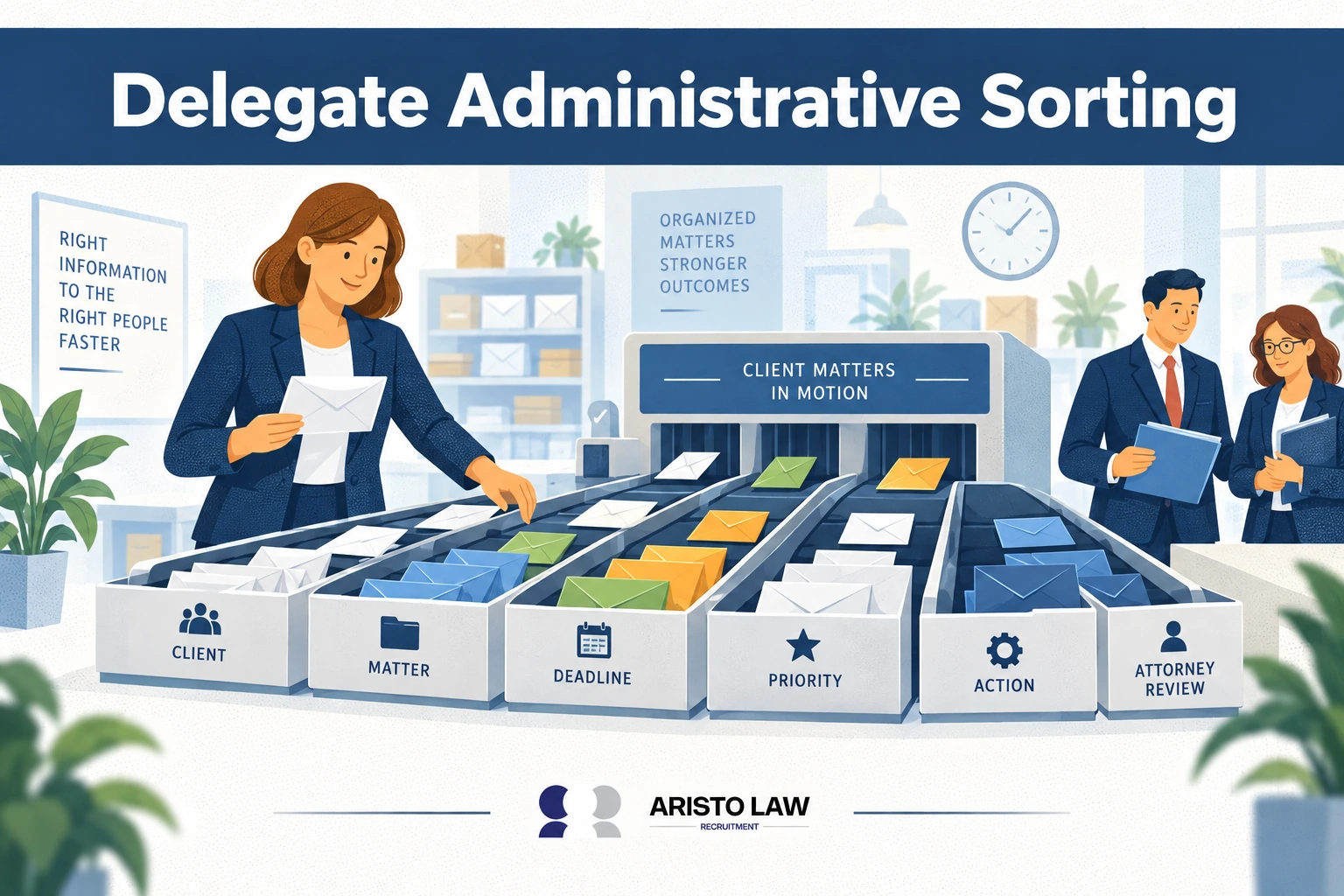
Managing email for lawyers requires administrative sorting, priority
tagging, inbox routing, and document classification before attorneys
review legal correspondence. Managing email for lawyers becomes more
organized when firms use virtual
legal administrative assistant services to delegate
message screening, follow-up tracking, calendar coordination, and
case-related inbox updates.
An industry operations study by Clio in 2025, titled The 2025
Legal Trends Report, states that delegating non-billable, administrative
sorting tasks to specialized assistants allows practicing attorneys to
recover lost operational capacity, maximizing their daily time
investment in complex legal strategy and client revenue
generation. Best practice includes defining delegation rules
and maintaining attorney oversight for legal communications.
14. Archive resolved files
Archiving resolved files transfers completed matters into
secure long-term storage while keeping active inboxes
organized. Proper archiving supports document retention, audit
readiness, and future reference without cluttering daily workflows.
A legal records management study by NetDocuments in 2025,
titled The Strategic Value of Modern Legal Document Management Systems,
states that systematically archiving resolved files into specialized
long-term repositories preserves vital historical records and document
audit trails under strict encryption protocols while satisfying
compliance mandates. Best practice includes archiving matters
immediately after completion using standardized retention
procedures.
15. Streamline message length
Streamlining message length improves readability, accelerates
communication, and reduces misunderstanding between attorneys, clients,
courts, and staff. Concise emails communicate legal information
efficiently while preserving professionalism and clarity.
A communication study by the International Legal Technology
Association (ILTA) in 2025, titled Clarity Over Complexity: Modernizing
Legal Communication, states that stripping out unnecessary legalese and
streamlining message length increases recipient comprehension scores by
42%, making complex legal information instantly readable for clients and
support staff. Best practice includes placing the primary
message at the beginning, using short paragraphs or bullet points when
appropriate, and removing unnecessary wording before sending.
How
do document and email management work together in law firms?
Document and email management work together in law firms by
organizing emails and attachments alongside case documents.
Document and email management create a centralized, searchable, secure,
and compliant record of all client communications and legal files
throughout the matter lifecycle.
Email management captures client correspondence, document management
systems (DMS) store and classify legal files, and practice management
platforms connect both to the appropriate matter so attorneys and staff
access complete case records from a single location. Integrated systems
capture emails from Microsoft Outlook, Microsoft 365, Gmail, and Google
Workspace, associate messages with client matters, store attachments
automatically, apply metadata, maintain version control, archive
communications according to retention policies, and support full-text
search, audit trails, legal holds, eDiscovery, secure cloud storage,
backup, and disaster recovery.
Integrations with NetDocuments, iManage, Worldox, Clio, LEAP, MyCase,
PracticePanther, CRM systems, e-signature platforms, workflow automation
tools, and case management software eliminate duplicate documents and
reduce misplaced emails. These integrations improve collaboration,
strengthen cybersecurity, increase operational efficiency, and support
remote work and regulatory compliance.
Managing email for lawyers connects client communications, pleadings,
discovery notices, and court correspondence to matter-specific document
systems through structured filing rules. Managing email for lawyers
strengthens matter organization when inbox workflows connect with legal
document and records management services that classify
emails, preserve attachments, track versions, and maintain searchable
case records.
Listed below are 12 integrated document and email management
workflows.
-
Automatic Email Capture: Stores inbound and outbound
emails directly within the appropriate client matter. -
Matter-Centric Filing: Associates emails,
attachments, and legal documents with a single case file. -
Automatic Attachment Storage: Saves email
attachments into the document management system without duplicate
uploads. -
Metadata and Document Indexing: Applies matter
numbers, client names, document types, and other searchable
metadata. -
Version Control: Tracks revisions and preserves
previous document versions for auditability. -
Client Correspondence Management: Maintains a
complete history of attorney-client communications. -
Records Retention and Legal Holds: Enforces
retention schedules while preserving documents subject to litigation or
regulatory requirements. -
OCR and Full-Text Search: Converts scanned documents
into searchable records for faster retrieval. -
Workflow Automation: Automates document routing,
approvals, notifications, and filing processes. -
Role-Based Security: Protects confidential
information using permissions, encryption, and multi-factor
authentication (MFA). -
Quality Assurance and Audits: Reviews filing
accuracy, metadata consistency, and compliance with firm policies. -
Performance Measurement: Tracks email filing
accuracy, document retrieval time, response time, duplicate record rate,
administrative hours saved, compliance rate, staff productivity, client
satisfaction, and operational efficiency KPIs.
A study by AIIM titled “State of the Intelligent Information
Management Industry” in year 2025, states that organizations
implementing integrated information and records management are 1.5 times
more likely to gain significant competitive advantages in collaboration
and resource optimization, directly improving document retrieval,
compliance, and governance while lowering information-related
risks. Structured document management and information
governance reduce time spent searching for information, improve
workforce productivity, and strengthen operational efficiency.
What tools help law
firms manage email?
Law firms use Microsoft Outlook, Gmail for Google Workspace,
Clio, PracticePanther, NetDocuments, iManage, Worldox, Litify,
Smokeball, and Lawmatics to organize legal email by matter, client,
deadline, document type, and case workflow.
Law firms also use Zapier, Microsoft Teams, Slack, DocuSign,
Proofpoint, Mimecast, and Microsoft Purview to connect email management
with workflow automation, team collaboration, e-signature routing,
cybersecurity, compliance monitoring, and legal correspondence
control.
The table below shows the best tools for managing legal emails.
| Tool Category | Purpose | Popular Tools | Primary Use for Law Firms | Key Features |
|---|---|---|---|---|
| Email Platforms | Manage daily legal communication | Microsoft Outlook, Microsoft 365, Gmail, Google Workspace |
Client emails, staff updates, calendars, shared inboxes | Search, inbox rules, calendars, shared mailboxes |
| Legal DMS | Store emails with case documents | NetDocuments, iManage, Worldox | Matter-centric email filing and document retrieval | Metadata, full-text search, version control |
| Practice Management | Connect emails to matters | Clio, LEAP, MyCase, PracticePanther, Smokeball | Link emails, tasks, deadlines, billing, and case files | Matter files, calendaring, billing links |
| Email Filing Tools | File messages by client matter | DMS filing tools, Outlook add-ins | Reduce misplaced emails and duplicate records | Auto-filing, drag-and-drop filing, tagging |
| CRM Systems | Manage leads and client records | Lawmatics, Clio Grow, HubSpot, Salesforce | Intake, follow-up, lead tracking, client communication | Pipelines, automation, contact history |
| Workflow Automation | Automate repetitive email work | Zapier, Make, Microsoft Power Automate | Create tasks, reminders, filing workflows, alerts | Triggers, rules, integrations |
| Collaboration Tools | Improve team communication | Microsoft Teams, Slack | Internal discussions and matter updates | Channels, file sharing, notifications |
| Email Security | Protect confidential messages | Microsoft Purview, Mimecast, Proofpoint, Barracuda |
Email encryption, DLP, threat filtering | Encryption, policy controls, phishing defense |
| Spam Protection | Block malicious emails | Proofpoint, Mimecast, Barracuda, Microsoft Defender |
Reduce phishing, malware, ransomware, spoofing | Filtering, sandboxing, threat alerts |
| Backup and Archiving | Preserve email records | Exchange Online Archive, Dropsuite, Barracuda Cloud Backup |
Retention, recovery, compliance audits, legal holds | Archiving, restore, retention policies |
| E-Signature | Execute documents securely | DocuSign, Adobe Sign | Engagement letters, forms, approvals, client signatures | Audit trails, templates, secure signing |
| Scheduling Tools | Manage meetings and consultations | Outlook Calendar, Calendly | Consultation booking, reminders, attorney calendars | Booking links, calendar sync, reminders |
| Analytics Tools | Measure email productivity | Microsoft Viva Insights, EmailAnalytics | Review email volume, response time, staff workload | Response metrics, workload trends, reports |
Integrated email management tools connect email platforms, document
management systems, CRM software, practice management platforms, cloud
storage, and billing software. Integration reduces duplicate work,
improves matter-centric filing, strengthens records retention, and
increases law firm productivity. Tool selection should match firm size,
security requirements, compliance obligations, cloud or on-premise
deployment needs, integration depth, scalability, and budget.
A Microsoft Work Trend Index report found that heavy email
users spend 8.8 hours per week on email, and the average employee spends
57% of Microsoft 365 work time communicating through meetings, email,
and chat. A study by IBM titled “Cost of a Data Breach
Report” in year 2024, states that the global average cost of a data
breach reached $4.88 million, representing a 10% spike from the previous
year and the highest average cost recorded since the inception of the
annual tracking series, showing why law firms need email
security, encryption, backup, archiving, and access controls.
How should
lawyers choose email management software?
Lawyers choose email management software by matching the
platform to matter-based filing, document management integration,
confidentiality controls, and the firm’s existing case management
workflow.
The table below shows how lawyers should choose email management
software.
| Selection Dimension | What to Evaluate | Why It Matters for Law Firms |
|---|---|---|
| Matter-Centric Filing | Automatic filing of emails and attachments into client matters | Creates complete case records and reduces misplaced communications |
| Outlook/Gmail Support | Native integration with Microsoft Outlook, Microsoft 365, Gmail, and Google Workspace |
Preserves existing email workflows and improves user adoption |
| Document Management System (DMS) Integration | Compatibility with NetDocuments, iManage, Worldox, and other DMS platforms |
Synchronizes emails, documents, and metadata across every legal matter |
| Practice Management Integration | Integration with Clio, LEAP, MyCase, PracticePanther, Smokeball, and similar systems |
Connects email with cases, billing, calendaring, and client records |
| Search Functionality | Full-text search, metadata search, OCR, filters, and advanced search tools |
Accelerates document retrieval and legal research |
| Workflow Automation | Automatic filing rules, task creation, notifications, and approval workflows |
Reduces manual administration and improves operational efficiency |
| Predictive Filing | AI-assisted matter suggestions and automatic classification | Improves filing accuracy and saves staff time |
| Mobile Access | Secure access from smartphones and tablets | Supports attorneys working remotely or in court |
| Offline Access | Ability to view and manage emails without an internet connection |
Maintains productivity during travel or connectivity interruptions |
| Security and Encryption | End-to-end encryption, multi-factor authentication (MFA), role-based permissions, and audit logs |
Protects confidential client information and supports legal compliance |
| Records Retention and Archiving | Legal holds, retention policies, email archiving, and audit trails |
Supports regulatory compliance, eDiscovery, and records management |
| Permissions and Access Control | Granular user permissions based on role or matter | Restricts unauthorized access to confidential legal information |
| Cloud vs. On-Premise Deployment | Hosting model, scalability, backup, and maintenance requirements |
Aligns software with firm security policies and IT strategy |
| Migration Tools | Import capabilities for historical emails, folders, contacts, and metadata |
Simplifies transition from legacy email systems |
| Collaboration Features | Shared matter folders, document sharing, comments, and task assignment |
Improves teamwork across attorneys and legal support staff |
| Reporting and Analytics | Email activity reports, productivity dashboards, and compliance monitoring |
Measures workflow performance and operational efficiency |
| Training and User Adoption | Onboarding resources, documentation, webinars, and certification programs |
Accelerates implementation and reduces learning curves |
| Vendor Support | Technical support availability, response times, implementation assistance, and service-level agreements |
Ensures rapid issue resolution and long-term reliability |
| Total Cost of Ownership | Subscription fees, implementation costs, migration expenses, training, support, and future scalability |
Provides a complete assessment of long-term investment rather than software price alone |
Law firms evaluating email management software should prioritize
solutions that combine matter-centric filing, strong security controls,
seamless integration with practice management and document management
systems, powerful search capabilities, workflow automation, and reliable
vendor support. The most suitable legal email management software
improves productivity, protects client confidentiality, simplifies
compliance, and scales with the firm’s operational and growth
requirements.
How much
does legal email management software cost?
Legal email management software costs between $10-$100+ per
user per month for cloud-based subscriptions.
Enterprise email management and archiving solutions cost
$5,000–$100,000+ for implementation, licensing, security, and
integrations, depending on the law firm’s size and requirements
The table below outlines the cost range for legal email management
software..
| Software Type | Typical Pricing Model | Typical Cost Range | Included Features | Best For |
|---|---|---|---|---|
| Email Platforms | Per user/month | $10–$40/user/month | Business email, calendars, shared mailboxes, basic security | Solo practices and small firms |
| Legal Document & Email Management Systems | Per user/month or enterprise license | $40–$120+/user/month | Matter-centric filing, document management, metadata, version control, search |
Small to enterprise law firms |
| Email Security Platforms | Per user/month | $3–$15/user/month | Threat protection, phishing filtering, encryption, data loss prevention (DLP) |
Firms requiring advanced cybersecurity |
| Email Archiving Solutions | Per user/month | $2–$10/user/month | Retention policies, legal holds, eDiscovery, compliance archives |
Firms with compliance and records retention requirements |
| Secure Email Encryption | Per user/month | $2–$15/user/month | End-to-end encryption, secure message delivery, access controls | Firms handling confidential client information |
| Email Backup Solutions | Per user/month or storage-based | $2–$12/user/month | Cloud backup, recovery, ransomware protection, retention | Firms seeking disaster recovery and business continuity |
| Enterprise Compliance Platforms | Enterprise licensing | $5,000–$100,000+/implementation | Information governance, audit trails, compliance reporting, advanced security |
Mid-sized and enterprise law firms |
| Implementation & Migration Services | One-time project fee | $1,000–$25,000+ | Data migration, configuration, integrations, testing | Firms replacing legacy systems |
| User Training & Onboarding | One-time or subscription | $500–$10,000+ | Staff training, documentation, onboarding support | Firms implementing new systems |
| API Integrations & Custom Development | Project-based | $1,000–$20,000+ | CRM, practice management, DMS, billing, workflow automation integrations |
Firms requiring customized workflows |
Legal email management software pricing varies according to firm
size, number of users, email volume, storage requirements, cybersecurity
controls, compliance obligations, cloud versus on-premise deployment,
implementation complexity, vendor support, and integration requirements.
Solo practitioners generally rely on per-user subscriptions with minimal
implementation costs, while larger firms often invest in enterprise
licensing, advanced compliance platforms, and custom integrations.
Before selecting a solution, law firms should evaluate total cost of
ownership (TCO), scalability, uptime, vendor support quality, security
certifications, integration capabilities, migration requirements,
ongoing administration, and long-term return on investment rather than
subscription price alone. Integrated email management systems reduce
administrative time, improve document retrieval, strengthen regulatory
compliance, minimize email-related security risks, and improve
collaboration across legal teams.
A study by Microsoft titled “Work Trend Index” in 2025 states
that the average employee spends 57% of their workday purely on
communication coordination, including managing high-volume email, chat
notifications, and meetings, leaving only 43% of their time available
for actual task creation and highlighting the critical
necessity of integrating workflow automation tools.
Where
can law firms get legal email management solutions?
Law firms get legal email management solutions from legal
technology vendors, document management providers, managed IT providers,
and legal support providers such as Aristo Law that help organize,
monitor, file, and manage legal email workflows.
Managing email for lawyers means sorting client messages, court
notices, opposing counsel emails, case updates, and deadline-related
correspondence into clear action categories. Legal
email management support services help law firms manage
lawyer inboxes through message triage, priority routing, deadline
flagging, follow-up tracking, and case-specific email organization.
Listed below are the 10 sources for legal email management
solutions.
-
Cloud Productivity Providers: Microsoft 365,
Microsoft Outlook, Google Workspace, and Gmail provide secure email
hosting, calendars, shared mailboxes, mobile access, spam filtering, and
cloud collaboration. -
Legal Practice Management Vendors: Clio, LEAP,
MyCase, PracticePanther, and Smokeball connect email to matters, tasks,
deadlines, billing, CRM records, and client communication workflows. -
Document Management Providers: NetDocuments,
iManage, and Worldox provide matter-centric email filing, document
synchronization, metadata, search, version control, audit trails, and
records management. -
Cybersecurity Vendors: Mimecast, Proofpoint,
Barracuda, Microsoft Purview, Zix Secure Email, Virtru, and Cisco Secure
Email provide email encryption, phishing protection, DLP, threat
filtering, secure delivery, and compliance controls. -
Email Archiving Providers: Microsoft Exchange Online
Archive, Dropsuite, and Barracuda support email retention, legal holds,
backup, disaster recovery, eDiscovery, and compliance audits. -
Managed IT Service Providers: MSPs implement email
security, backup, monitoring, migration, access controls, MFA, user
training, and ongoing support for solo, small, mid-sized, and enterprise
law firms. -
Legal Technology Consultants: Consultants evaluate
email workflows, select software, manage implementation, train staff,
and integrate email systems with DMS, CRM, practice management, billing,
and e-signature platforms. -
Systems Integrators and Cloud Migration Specialists:
Implementation partners migrate legacy email, configure permissions,
connect APIs, automate workflows, and reduce disruption during
deployment. -
Legal Operations Consulting Firms: Legal operations
consultants align email management with information governance, document
retention, matter management, cybersecurity, and law firm productivity
goals. -
Outsourced Legal Support Providers: Aristo Law
supports law firms through trained remote legal assistants who organize
inboxes, file emails by matter, manage client communication, coordinate
calendars, maintain document workflows, and reduce attorney
administrative workload.
Law firms should evaluate encryption standards, security
certifications, uptime, backup strategy, disaster recovery, integration
depth, migration support, support quality, vendor reputation, total cost
of ownership, and long-term scalability.
How
does Aristo Law help law firms manage email efficiently?
Aristo Law helps law firms manage email efficiently by
providing dedicated remote legal professionals who organize, prioritize,
file and manage legal communications using standardized workflows,
allowing attorneys to spend more time on billable legal work and client
representation. As a Legal Process Outsourcing (LPO) provider,
Aristo Law recruits, screens, interviews, and matches experienced
virtual legal assistants, legal administrative assistants, remote
paralegals, legal secretaries, intake specialists, and executive
assistants.
Aristo Law matches each legal support role with the firm’s
communication processes, technology stack, and operational requirements.
Aristo Law legal support professionals integrate into daily workflows
using Microsoft Outlook, Microsoft 365, Google Workspace, Gmail,
NetDocuments, iManage, Worldox, Clio, LEAP, MyCase, PracticePanther, CRM
platforms, e-signature systems, cloud storage, and workflow automation
tools.
Aristo Law also helps firms establish standard operating procedures
(SOPs), matter-based filing standards, folder hierarchies, email
retention policies, naming conventions, confidentiality controls,
role-based permissions, multi-factor authentication (MFA), quality
assurance processes, and workflow automation to improve consistency,
compliance, cybersecurity, and client service while reducing recruitment
costs and administrative overhead.
Listed below are 13 services Aristo Law offers to help improve legal
email management.
-
Remote Legal Staffing: Aristo Law recruits and
places remote legal professionals who support each law firm’s email
workflows, communication processes, and practice-area needs. -
Attorney Inbox Organization: Aristo Law organizes
attorney inboxes and shared mailboxes by sorting messages, prioritizing
urgent communications, and reducing email backlog. -
Legal Email Triage: Aristo Law categorizes client
emails, court notices, vendor messages, and internal communications
based on urgency, matter relevance, and required action. -
Matter-Centric Email Filing: Aristo Law files legal
emails by matter, client, case stage, and document category to maintain
complete case communication records. -
Client Intake Email Routing: Aristo Law manages
intake emails by routing prospective clients through structured intake
workflows, qualification steps, and attorney review paths. -
Calendar and Appointment Coordination: Aristo Law
schedules consultations, meetings, reminders, and attorney calendar
updates from email-based requests to reduce missed appointments. -
Attachment and Document Organization: Aristo Law
organizes email attachments, pleadings, contracts, forms, and client
documents within NetDocuments, iManage, Worldox, and other DMS
platforms. -
Practice Management Software Updates: Aristo Law
updates CRM systems and practice management platforms with client
messages, matter notes, tasks, deadlines, and case activity. -
Follow-Up Tracking: Aristo Law creates follow-up
reminders, task assignments, and response queues to improve attorney
response time and deadline control. -
Court Notice Monitoring: Aristo Law monitors court
notices, filing confirmations, hearing updates, billing emails, and
vendor communications to reduce administrative risk. -
Email SOP Implementation: Aristo Law helps law firms
apply email SOPs, naming conventions, folder structures, and inbox rules
for consistent legal email handling. -
Confidentiality and Access Controls: Aristo Law
supports secure email workflows through role-based access,
confidentiality practices, permission controls, and legal email
management procedures. -
Email Performance Monitoring: Aristo Law tracks
operational email KPIs such as response time, inbox processing time,
filing accuracy, missed deadline rate, workflow completion time,
productivity, and administrative hours saved.
A study by McKinsey & Company titled “The State of
Organizations 2026” in year 2026, states that organizations optimizing
systems through workflow redesign and automation achieve exponential
performance gains, with 47% of executives confirming it directly reduces
administrative workload and frees teams to focus on high-value strategic
initiatives. Knowledge workers spend a significant portion of
the workweek managing digital communications, demonstrating the
operational value of dedicated administrative support, structured
communication management, and automated workflows for law firms.
Build a legal support team that moves work forward.
Tell us what is slowing your practice down. We will help map the role, workflow, and support structure that fits.